Behavioral Analysis
Stop bots that act almost like people, and stop them faster each time they come back.
Rate limiting stops visitors who are too fast right now. But it has a short memory. When a burst ends, it forgets. A patient bot can wait, come back, and try again, as often as it likes.
This add-on remembers. It keeps a record of each visitor that caused trouble, for hours or days. When that visitor comes back, BotBlocker gives it much less room, and stops it much sooner than the first time. A visitor that behaves well slowly gets a clean record again.
It also catches careful bots that never trip your rate limits. A person reads, clicks around, and comes from links. A bot opens page after page, at a steady pace, and never comes from anywhere. The add-on sees this difference.
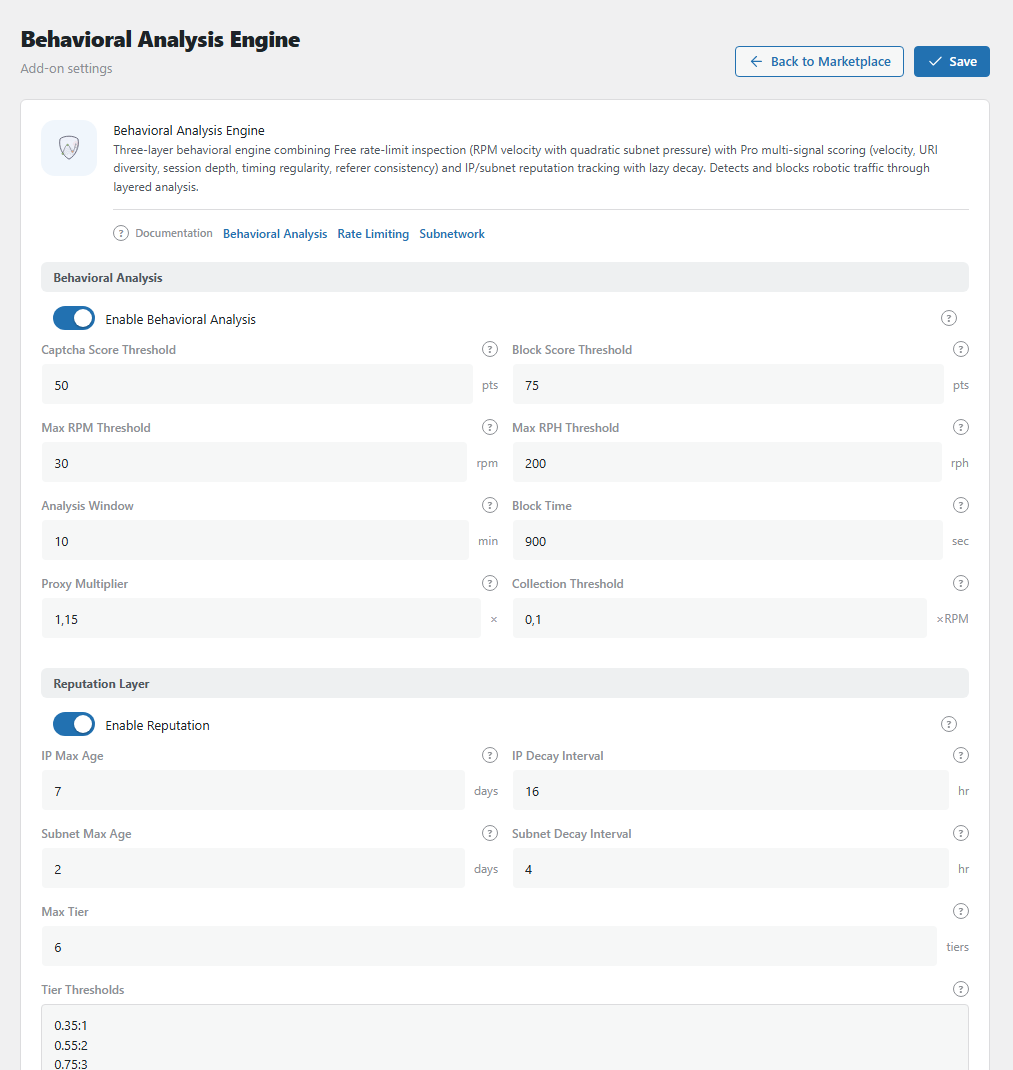
The Behavioral Analysis Engine panel. Open it from BotBlocker → Add-ons.
How it works
1. It watches only busy visitors. A normal reader who opens a few pages is never checked. The add-on starts to watch a visitor only when they get close to your rate limits. Visitors who already passed a verification check are skipped, because they proved that they are human.
2. It looks at how the visitor behaves. For a busy visitor, the add-on asks a few questions. How fast does it open pages? Does it open each page only once, like a copying tool? Is its timing too regular for a person? Does it ever come from a link? The more answers point to a bot, the higher its score.
3. It acts on the score. A low score changes nothing. A medium score shows a verification check, and a real person passes it and continues. A high score blocks the visitor for a short time. You can see each block in your IP rules, with the note "Behavioral Engine Block", and delete it there.
4. It remembers. Each visitor that was blocked or came close gets a penalty. The next time, it needs a much lower score to get a check or a block. BotBlocker keeps a penalty for the address, and also for its network (a group of nearby addresses), because bots often jump between addresses in one network. Networks are forgiven faster, because many innocent people can share one.
5. It forgives. When the visitor stays quiet, the penalty goes down step by step. With the default values, a blocked address has a clean record again after about 4 days. If you delete its block rule, the record is deleted at once.
This add-on works together with rate limiting, so rate limiting must be on. It only adds and changes its own block rules, never the rules that you made.
Pick a preset
At the bottom of the panel, you can apply a ready-made set of values with one click:
- Light: more relaxed. Fewer real people get a check.
- Strong: balanced. This is the default, and it fits most sites.
- Full: strictest. Lower scores trigger a check or a block, and blocks last 1 hour.
Start with Strong. Move to Full if bots still get through, or to Light if real people complain.
Settings
The ready-made values work well for most sites. Change a setting only when you know what problem you want to fix. Each setting below tells you what happens when you make the number higher or lower.
Scoring
These settings control how the add-on scores a busy visitor right now. It adds points for 5 signs, in the last few minutes of the visit (the Analysis Window):
| Sign | What it measures | Up to |
|---|---|---|
| Speed per minute | Requests per minute, compared with Max RPM | 40 |
| Many different pages | How many different addresses it opens | 20 |
| Speed per hour | Requests per hour, compared with Max RPH | 15 |
| Perfect rhythm | How regular the time between requests is | 15 |
| No referrer | Requests with no referrer (the page it came from) | 10 |
The points add up to a score from 0 to 100. At the Captcha Score Threshold (50), the visitor gets a verification check. At the Block Score Threshold (75), it is blocked for the Block Time.
Enable Behavioral Analysis
Default: On after activation
The main switch for the add-on. It is locked until rate limiting is on.
Captcha Score Threshold
Default: 50 points
The score at which a visitor must prove they are human. They see a verification check, and if they pass, they continue as normal.
- Lower number: stricter. More visitors see a check, and some of them are real people.
- Higher number: more relaxed. Fewer checks, but some careful bots get through.
Be careful with numbers below 35. A fast reader with many open tabs can reach them without doing anything wrong.
Block Score Threshold
Default: 75 points
The score at which a visitor is blocked at once, with no check.
Keep a clear gap to the Captcha threshold, for example 25 points. Then a visitor who looks a bit suspicious first gets a check, and only clearly robotic visitors are blocked. If the two numbers are too close, real people can be blocked before they get a chance to prove they are human.
Max RPM Threshold
Default: 30 requests per minute
RPM means requests per minute. This is your idea of "the fastest a real person moves". A visitor at this speed gets all 40 points for speed. A visitor at half this speed gets 20 points.
- Lower number: fast visitors collect points sooner.
- Higher number: use this if your visitors are often very fast, for example on a shop where people click through filters quickly.
Max RPH Threshold
Default: 200 requests per hour
RPH means requests per hour. The same idea as Max RPM, but for a longer time. It catches the slow scraper that makes only 3 requests per minute, but never stops. A visitor at this number gets all 15 points for this sign.
Analysis Window
Default: 10 minutes
How much recent history the add-on looks at when it scores a visitor.
- Shorter window: reacts fast to a sudden change, but forgets fast too.
- Longer window: sees a slow bot better, but a real person who was busy for a moment keeps the points longer.
This is not the long-term memory. That is the Reputation Layer below.
Block Time
Default: 900 seconds (15 minutes)
How long a blocked address stays blocked. When the time ends, the block rule goes away by itself. But the address keeps its penalty level, so if it comes back and misbehaves, it is stopped much sooner.
A short block is usually enough. The long-term protection comes from the Reputation Layer, not from a long block.
Proxy Multiplier
Default: 1.15
Gives more room to visitors who come through a proxy or VPN. A proxy or VPN is a service that hides the real address of a visitor. Many real people use one for privacy, and many people can share the same proxy address. So their traffic can look busier than it is.
BotBlocker multiplies both thresholds by this number for them. With 1.15, a proxy visitor needs about 58 points for a check instead of 50, and about 87 points for a block instead of 75.
- 1.00: treat proxy visitors like everyone else.
- Higher number: more room for proxy visitors.
Collection Threshold
Default: 0.35
How busy a visitor must be before the add-on starts to watch them. Quiet visitors are never scored, so they cost your site nothing.
The number is a part of the Block Threshold in rate limiting. For example, if rate limiting blocks at 40 requests per minute, 0.35 means that the add-on starts to watch a visitor at 14 requests per minute.
- Lower number: the add-on watches more visitors.
- Higher number: the add-on watches only the busiest visitors.
Reputation Layer
These settings control the memory: how long BotBlocker remembers a troublemaker, and how fast it forgives them. See steps 4 and 5 in How it works.
Each address and each network gets a penalty level, from 0 (clean) to the Max Tier (6). A visitor that is blocked, by this add-on or by rate limiting, gets the highest level at once. A visitor that is fast but not blocked gets a lower level (see Tier Thresholds).
A higher level lowers the score that is needed for a check or a block. At level 0, a visitor needs 75 points for a block. At level 3, about half is enough (38 points). At the highest level, only the minimum is left. The thresholds never drop below the Floor % of rate limiting.
The level goes down by 1 after each quiet period (IP Decay Interval, Subnet Decay Interval). For example, an address blocked on Monday at 10:00 for 15 minutes gets level 6. The clock starts when the block ends. With 16 hours per level, it is at level 5 on Tuesday at 02:15, and back at level 0 after about 4 days. If it misbehaves again, its level goes back up.
Enable Reputation
Default: On after activation
Turns the long-term memory on. When it is off, BotBlocker judges each visitor only by the last few minutes, and a bot that comes back after a block starts with a clean record.
Keep it on. It is the main reason to use this add-on.
IP Max Age
Default: 7 days
The longest time BotBlocker keeps the record of one address. After this time, the record is deleted, even if the penalty level is not back to 0.
Usually, the record gets back to 0 sooner because of the decay below. This setting is a safety limit, so old records do not stay forever.
IP Decay Interval
Default: 16 hours
How long an address must stay quiet before BotBlocker lowers its penalty by one level. This is the "forgive" speed.
With 16 hours, a blocked address (level 6) needs 6 × 16 = 96 hours, about 4 days of good behavior, to get a clean record again.
- Shorter interval: BotBlocker forgives faster. Good if real people get caught often.
- Longer interval: BotBlocker remembers longer. Good if the same bots come back again and again.
Subnet Max Age
Default: 2 days
The same as IP Max Age, but for a network range. A network range (subnet) is a group of nearby addresses, for example all addresses of one office or one mobile provider.
BotBlocker watches ranges because bots often change their address inside one range. But many innocent people can share a range too. So keep this shorter than IP Max Age.
Subnet Decay Interval
Default: 4 hours
The same as IP Decay Interval, but for a network range. With 4 hours, a range at level 6 is clean again after 24 quiet hours. It is short on purpose, so one bot does not hurt a whole office or mobile network for long.
Max Tier
Default: 6 tiers
The number of penalty levels. The highest level always goes to blocked visitors, and it removes almost all patience for them.
More levels make each step smaller, and decay takes longer. You seldom need to change this.
Tier Thresholds
Default: 5 lines, from 0.35:1 to 1.15:5
Decides which penalty level a fast visitor gets, even when they are not blocked. Each line is a pair: speed and level. Speed is a part of Max RPM.
With the default values and Max RPM 30:
| Line | Meaning |
|---|---|
0.35:1 |
11 or more requests per minute gives level 1 |
0.55:2 |
17 or more gives level 2 |
0.75:3 |
23 or more gives level 3 |
0.95:4 |
29 or more gives level 4 |
1.15:5 |
35 or more gives level 5 |
Level 6 is not in this list. Only a block gives level 6.
This is the most technical setting here. Save a copy before you change it. If something goes wrong, apply a preset to get good values back.
When real people get caught
Busy people can look like bots. Someone with many tabs, a developer who reloads a page, or a monitoring service can collect points. When you look at a complaint, look for "Behavioral Engine" as the reason.
- Real visitors see a check too often? Raise the Captcha Score Threshold, or apply the Light preset.
- One address is blocked by mistake? Delete its "Behavioral Engine Block" rule in your IP rules. This also clears its reputation.
- One office or school complains? Lower the Subnet Max Age. Do not turn off the whole add-on.
- Your uptime monitor gets blocked? Add its address to your allow rules.
- The enable switch is locked? Turn on rate limiting first. Use the link in the panel warning.