WordPress abilities and connectors
Let AI assistants and other tools ask BotBlocker questions, or even block an address, with exactly the access you choose.
New WordPress versions have the Abilities API. With it, a plugin can publish named actions, called abilities. Other software can find these actions and call them: REST clients, automation tools, and AI assistants through MCP. So you can ask an assistant "is this IP blocked?" and get an answer from BotBlocker, without opening the Dashboard. Read-only abilities that take no arguments also run over REST GET: a missing or empty input is accepted, and a non-empty payload is refused.
This is useful, but it also opens a door. A reading ability is harmless. An ability that blocks an address changes your protection. That is why every BotBlocker ability is off by default. A master switch controls the whole feature, and each ability has its own switch. You publish only the actions you trust, and nothing more.
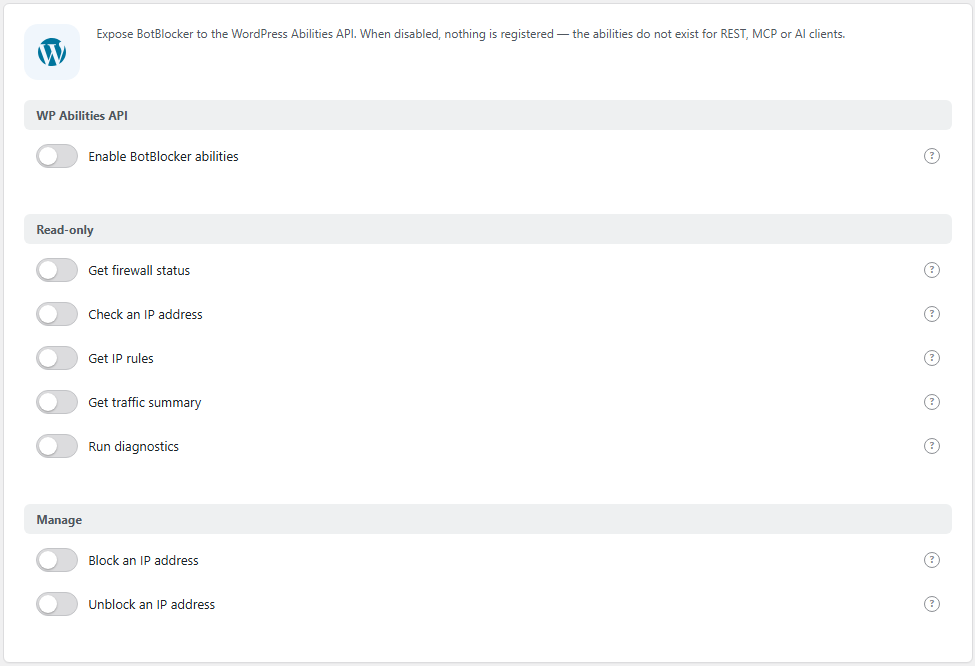
The WP Abilities API panel. Open it from BotBlocker → Integrations → WP Abilities API.
When it is off, the abilities do not exist
When the master switch is off, BotBlocker registers nothing. Its abilities do not show in the ability list, in REST, in MCP, or in the run endpoints. A client cannot call something that does not exist. This is the safe state, and it is the default.
When you turn the master switch on, only the abilities with their own switch on become visible. If your WordPress version does not have the Abilities API, BotBlocker registers nothing, even with all switches on.
Switching a whole group at once
There are many switches, so the left column has three buttons above the list. They set the switches on the page; nothing is saved until you press Save. Hover a button to see what it does.
- Enable all turns the master switch on and every BotBlocker ability on. Add-on abilities are not affected, because their switches live in the add-on settings.
- Read-only turns the master switch on, every ability off, and then the read-only group on. This is the usual starting point: a client can ask questions and cannot change protection.
- Disable all turns the master switch off and every ability off. Clients see nothing from BotBlocker again.
Only administrators can call them
Every BotBlocker ability needs the manage_options capability, so only an administrator account can call it. The client (the assistant or tool) acts with the account that it signs in with. So treat a client that can call these abilities like a person with your admin password. Give it an account and credentials that you control.
Start with reading, add changing later
The abilities are in groups:
- Read-only abilities only give information. They cannot change anything. Start with these.
- Manage abilities change IP rules, maintenance data and installed add-ons. Turn them on only when you have a clear task for them.
- Protection control (destructive) abilities change your protection settings: turning protection on or off, switching the secure mode or the CAPTCHA mode, and clearing the cache. They act like an administrator using the Dashboard.
- Malware Scanner (PRO) abilities start a scan or read its results. You see them only when the Malware Scanner add-on is active.
- Add-on abilities are switches that live in the add-on's own settings. The WP Abilities API tab lists the add-ons that declare abilities and links to their settings; it does not save those switches.
Read-only abilities
Besides the older status, IP and diagnostic abilities, the read-only group now includes:
- List IP rules (
botblocker/list-ip-rules) lists firewall rules with filters for IPv4/IPv6, rule type, search text and pagination. Use it to inspect your lists without opening the Dashboard. - Get blocked IP addresses (
botblocker/get-blocked-ips) returns only the addresses that are actively blocked. Expired rules are left out. - Get recent events (
botblocker/get-recent-events) returns counts of blocks, allows, CAPTCHA events and proxy events per time bucket. It deliberately returns no individual IP addresses and no user agents. - Get settings (
botblocker/get-settings) returns non-secret BotBlocker settings. A named group gives a curated subset; groupallgives every setting the plugin stores. Credentials and personal data are reported only as a boolean insideredacted; the value itself is never returned.writablelists every key that Change a switch setting accepts, regardless of the requested group. - Get CAPTCHA state (
botblocker/get-captcha-state) shows the active CAPTCHA mode, the wait time and which modes are available on this site. A mode can be unavailable without GD or without reCAPTCHA keys. - Run self-test summary (
botblocker/run-self-test) returns the same summary that the self-test shows, without starting a new test or writing to the plugin log. - Check several IP addresses (
botblocker/check-ips) checks up to 20 addresses in one call, so an automation tool does not need one request per address.
Decision diagnostics
These abilities explain why a request was blocked, challenged or allowed. They read state and never write it.
- Simulate a request (
botblocker/simulate-request) takes an IP address and an optional fingerprint (path, user agent, referer, language, JA3 or JA4, cache pass) and returns the predicted decision, the reason code, the winning rule, the bot signal, the TLS category, geo and ASN, the current rate state and the layer that decided. Nothing is written, counters do not move and no external host is contacted. The prediction follows rule precedence, bot signatures and TLS data. It does not replay every check the live engine performs, so treat a mismatch as a lead to investigate with Get decision trace. - Get decision trace (
botblocker/get-decision-trace) reads the last stored visitor event for an IP address or a client id (cid, not both) and reports the stored decision, the numeric reason code, the IP rules that matched, the geo and ASN from the event, the masked edge identity and the current rate state. - Get rate-limit state (
botblocker/get-rate-limit-state) returns the individual and subnet buckets with the same keys the limiter uses, the window, the effective block and CAPTCHA thresholds, the subnet pressure and an active rate-limit ban. It reads the bucket without adding a hit, so calling it twice returns the same numbers. - Get request fingerprint (
botblocker/get-request-fingerprint) shows how BotBlocker reads a client: normalized IP, address family, user-agent family and hash, JA3 or JA4 headers, geo and ASN, language and protocol. It reports whether a TLS header was trusted, which is false for headers that did not come through a trusted proxy. Thepeerfield is the transport address of the current request and is returned unmasked for diagnostics. - Get data integrity (
botblocker/get-data-integrity) lists the runtime files in the data folder with size, modification time and, withinclude_content_hashes, SHA-256 hashes. It also reports missing files, unexpected files and the runtime settings file state. The plugin does not store expected hashes, sookonly means the file exists and is readable; no hash comparison is performed. - Get bot signature match (
botblocker/get-bot-signature-match) matches a user agent against the generated signature list and the search-engine list and returns the signature, the list type, the action and which verification tokens the entry carries. - Get TLS match (
botblocker/get-tls-match) looks up a JA3 or JA4 fingerprint and compares the expected user-agent family with the family derived from a user agent. No handshake is performed. - Get geo and ASN (
botblocker/get-geo) returns country, continent, ASN, organization and CIDR from the local ASN database. VPN, Tor and hosting stay false when the local database cannot decide them. - Get cache pass state (
botblocker/get-pass-state) checks a cache pass cookie: its format, its expiry and its signature. The signature is bound to the visitor id and IP, so passuidandipas well; without them the answer reportsbindings_missinginstead of guessing. The salt and the signature are never returned. - Get challenge state (
botblocker/get-challenge-state) returns the CAPTCHA mode,wait_seconds,retry_limitandretries_left, the provider and its availability, the fallback, whether silent mode is active, and stable issue codes. Passhitsto get the remaining attempts for that counter;retries_leftis null whenretry_limitis 0. - Get rule match (
botblocker/get-rule-match) returns every IP rule and custom rule that matches a fingerprint, ordered by priority, with the winning rule. - Get edge trust (
botblocker/get-edge-trust) shows the identity of the current request, the entries that were trusted automatically, and, withinclude_map, the proxy, crawler-network, auto-trust and shared-edge maps, withmaps_includedtelling whether they were read. Addresses are always masked. - Get edge evidence (
botblocker/get-edge-evidence) reads the evidence rows collected for unverified edges: peer, ASN, PTR, header, hit counters and the promotion thresholds. Addresses and PTR names are masked. - Explain a ban decision (
botblocker/explain-ban-decision) runs the real ban gate for a target without writing anything and reports whether a ban would be written and why. It uses the current request identity for omitted fields and does not resolve a PTR for the target. - Get layer state (
botblocker/get-layer-state) reports which layer answers: Early Init with the wp-config router flag and the router hash, the MU-plugin file hash, the main shield, the cache and geo gates, the auto-trust state, detected conflicts and versions. - Export diagnostics (
botblocker/export-diagnostics) bundles redacted settings, data-file integrity, layer state and the last decision in one answer. Redacted settings show the literal[redacted]instead of a value.
Test-only management
These abilities exist for a controlled test stand. They need a confirmation value, support dry_run and are rate limited.
- Reset a rate-limit bucket (
botblocker/reset-rate-limit) deletes the individual and subnet buckets for an IP address. It does not touch rules, settings or bans. Confirmation:RESET. - Seed a temporary test rule (
botblocker/seed-test-rule) creates a short-lived custom rule. The comment must start withbbcs-harness:andexpires_inis mandatory; anything else is refused. Confirmation:SEED. - Clear seeded test rules (
botblocker/clear-test-rules) deletes only rules whose comment starts withbbcs-harness:and leaves user rules alone. Confirmation:CLEAR. - Change a switch setting (
botblocker/set-setting) turns one boolean protection setting on or off through the Dashboard save path. Thekeyenum in the ability schema lists every accepted key. Confirmation:SET. The dedicated page explains the keys and shows call examples.
More read-only abilities:
- Get health score (
botblocker/get-health-score) returns the Dashboard health score and the state of each scored item. - Get protection snapshot (
botblocker/get-protection-snapshot) returns the protection state, secure mode, CAPTCHA mode, the preset that matches the current settings and whether edge auto-trust is on. Use Get firewall status for the minimal state and Get layer state for execution layers. - Get add-ons status (
botblocker/get-addons-status) lists installed BotBlocker add-ons with activation, compatibility, features and declared abilities. - List the add-on catalog (
botblocker/list-addon-catalog) returns the catalog entries with the slug every add-on ability needs, plus the offered version, required core version, installed and active flags, compatibility and update state. It filters by text, installed-only and updates-only, with limit and offset. It is read-only and does not download anything. - Get license status (
botblocker/get-license-status) reports whether the Cloud license is active, its type and tier, and the remaining days and hits. It never returns the key or secret. - Load license from cloud (
botblocker/load-license-from-cloud) asks the license server to push the stored license to this site, then reports the push state and the resulting license. It returns no key, nonce or signature. Confirmation:LOAD. Call Get license status afterwards to confirm that the license is active. - Get capabilities (
botblocker/get-capabilities) maps PRO features, add-on features, every registered ability with its enabled state, risk and owning add-on, and protection gates. - Validate configuration (
botblocker/validate-config) runs read-only checks on settings, the data folder, the runtime settings file and the database tables. - Get cron jobs (
botblocker/get-cron-jobs) lists BotBlocker cron events. Event arguments stay hidden unless a site filter setsargs_exposedto true. - Get database health (
botblocker/get-db-health) reports BotBlocker table presence, size and approximate row counts. On hosts that restrictinformation_schema, it returnsavailable=falseand a reason instead of an error. - Get top entities (
botblocker/get-top-entities) returns top countries, ASNs, user-agent groups, statuses or paths. It reads the daily summary first and uses raw tables only with a hard limit. - Get 2FA summary (
botblocker/get-2fa-summary) returns administrator two-factor counters. It never returns secrets, codes or recovery data. - Export settings (
botblocker/export-settings) exports one settings group or every stored setting; unlike Get settings, its default group isall. An unknown group is refused. Redacted values are replaced with the literal[redacted], andredacted_keysnames them. Masking is always on.
The next abilities read personal data: IP addresses, logins, user agents or paths. Masking is always on and cannot be turned off; the old mask_pii input was removed. Masking zeroes the last address octet, keeps the first characters of a login, e-mail or short reverse-DNS name, and truncates longer host names, user agents and stored result text. Rule management abilities return the stored address unmasked because they are administrative tools. Peer addresses in Get request fingerprint and the ban target in Explain a ban decision are also unmasked; Get decision trace, Get edge trust and Get edge evidence mask addresses, and the pseudonymous client ids in Get edge evidence are hashes that are never re-masked. By default BotBlocker also lists PII and destructive abilities in MCP discovery, because PII_OFF is true in the plugin. To hide them from discovery, define PII_OFF as false in wp-config.php before BotBlocker loads.
- Get audit log (
botblocker/get-audit-log) returns audit rows with filters for event, category, severity, actor and dates. - Get event details (
botblocker/get-event-details) returns one visitor event by its client id, with the address, the reverse-DNS name, the user agent and the path.tableselectshits,suspiciousorboth(default); the stored edge fields are added when the event carries them, and the rawaccesspayload is never returned. - Get top IP addresses (
botblocker/get-top-ips) returns the busiest addresses for a period. - Get login attempts (
botblocker/get-login-attempts) returns successful and failed login audit events. - Get visitor log (
botblocker/get-visitor-log) returns recent visitor events with IP, reverse-DNS name, user agent and path. - Get user risk (
botblocker/get-user-risk) returns user role, two-factor state and failed login counts. - Get ability calls (
botblocker/get-ability-calls) returns recorded ability calls with outcome, error and duration.
botblocker/check-ip checks the stored IP rules and hot-bans with the same priority order as the live engine: it ignores expired rules, ignores service rows for local and server addresses, and reports an active hot-ban. The answer includes source, matched_rules and the deciding_rule. It does not evaluate bot signatures, geo, ASN or rate limits; use Simulate a request for a full prediction, and Get IP rules for the full matching list.
IP rule management
- Create or update an IP rule (
botblocker/upsert-ip-rule) accepts an IP address or a CIDR range and a rule type:allow,block,grayordark. The answer reportscreated,previous_rule,changedandapplied. - Delete an IP rule by id (
botblocker/delete-ip-rule) deletes one rule by its numeric id. Rule ids are unique only inside one address family, so passfamily(ipv4oripv6) when the same id exists in both; otherwise the call is refused withability_ambiguous_rule_id. This is safer than removing every rule that matches an address.
Both abilities refuse to change or delete readonly rules, such as the administrator or server address rows. They also refuse to turn an allow rule into a block, or to block the current or server IP, unless you pass force: true. The older block-ip and unblock-ip abilities keep working and received the same guards.
Every rule answer uses the same fields: id, family, rule, value, priority, expires, expired, readonly and comment, where value holds the address or CIDR range. A rule id is unique only inside one address family.
More change abilities:
- Delete IP rules for an address (
botblocker/delete-ip-rules) removes every non-readonly rule for an IP address or CIDR range, and can limit itself to one rule type. It needsDELETEas confirmation. Prefer it when you want to remove all rules for an address, not one row by id. - Set a country rule (
botblocker/set-country-rule) creates, updates or disables a country allow/block rule. It needsCOUNTRYas confirmation. It refuses to block the country of the current request withoutforce: true. - Set an ASN rule (
botblocker/set-asn-rule) creates, updates or disables an ASN allow/block rule and rebuilds the ASN runtime file. It needsASNas confirmation. It refuses to block the current request ASN withoutforce: true. - Update threat data (
botblocker/update-threat-data) refreshes the ASN database, the LLM provider list or the TLS fingerprint list. It needsUPDATEas confirmation and supportsdry_run. It never deletes local rules. - Reset the PTR cache (
botblocker/reset-ptr-cache) deletes saved reverse-DNS answers and flushes the plugin cache, so the next checks look the names up again. It does not touch rules, settings or bans. It needsRESETas confirmation and supportsdry_run. - Apply a security preset (
botblocker/apply-preset) applies Balanced, Medium, Strong, Strong API, Full or Emergency. It reportsprevious_preset, compares the current settings with the presets first, then applies one, and then restores every ability switch from a snapshot taken before the call. If the snapshot cannot be taken, it refuses before applying. Full and Emergency need an active PRO license. It needsPRESETas confirmation.
Add-on management
These abilities manage installed add-ons the same way the Add-ons page does. They require manage_options, are rate limited and accept dry_run.
- Install or update an add-on (
botblocker/install-addon) downloads a package from the BotBlocker catalog by slug, validates the ZIP and the manifest, and installs or replaces it in the runtime add-on directory. It needs an active PRO license andINSTALLas confirmation. The add-on is not activated by this call; use Enable or disable an add-on after it is installed. The catalog URL must be on the plugin's allow list. - Enable or disable an add-on (
botblocker/set-addon-state) activates or deactivates an installed add-on through the same lifecycle path as the Add-ons page and emitsbbcs_addon_toggled. Activating an add-on that is incompatible with the installed core is refused withability_incompatible. Confirmation values areENABLEorDISABLE. - Delete an installed add-on (
botblocker/delete-addon) deactivates the add-on first when it is active, fires the delete lifecycle and removes the add-on folder. Confirmation:DELETE. Deletion cannot be undone by another ability; rundry_runfirst.
Install and delete are refused in local add-on mode and when DISALLOW_FILE_MODS is set. Get add-ons status shows what is installed and whether it is active.
Protection control (destructive)
These abilities require a confirmation value and are rate limited.
- Enable or disable protection (
botblocker/set-protection) turns BotBlocker protection on or off through the same path as the Dashboard toggle, including the runtime file used at the earliest layer. Confirmation values areENABLEorDISABLE. - Set the secure mode (
botblocker/set-secure-mode) switches betweenfrontendandfull. Full mode also challenges the WordPress admin area. Confirmation values areFRONTENDorFULL. - Set the CAPTCHA mode (
botblocker/set-captcha-mode) switches the CAPTCHA mode and optionally the wait time. A mode that is not available on this site is rejected with an error instead of silently falling back. - Clear the plugin file cache (
botblocker/clear-cache) clears the file cache after manual rule or data changes. - Remove an auto-trusted edge (
botblocker/remove-edge-trust) removes one entry from the auto-trust file by its mask, re-signs the file and recordsedge.trust.removedin the audit log. The answer reportsdeletedandremaining. Confirmation:REMOVE. Supportsdry_run.
Confirmation and dry runs
A destructive ability needs a confirm value that matches the action, for example DISABLE, DELETE, UPSERT, CAPTCHA, COUNTRY, ASN, UPDATE or PRESET. Without it, or with a token that does not match the target state, the call is refused with ability_confirmation_required and no change happens. A client should send the value only after it has decided that the change is intended. set-protection accepts ENABLE only with enabled: true and DISABLE only with enabled: false; set-secure-mode accepts FRONTEND only with mode: "frontend" and FULL only with mode: "full".
block-ip, unblock-ip, set-protection, set-secure-mode, set-captcha-mode, upsert-ip-rule, delete-ip-rule, delete-ip-rules, set-country-rule, set-asn-rule, update-threat-data, reset-rate-limit, reset-ptr-cache, seed-test-rule, clear-test-rules, remove-edge-trust, apply-preset, set-setting, set-security-headers-domains, clear-cache, install-addon, set-addon-state, delete-addon and load-license-from-cloud accept dry_run: true. Every answer carries dry_run and applied. On a dry run applied is false, and facts such as created, deleted, restored_toggles and a new rule id stay neutral; fields that describe the state (previous*, found, remaining, current, added, removed) are filled with the projection. protection_enabled is always the real current state. Use a dry run before a real call.
Calls from signed-in users are written to the audit log with the ability name, the caller, the IP address, the user agent, the outcome and the duration, including calls refused by a permission check, a confirmation word or the rate limit. Calls rejected for invalid input are not recorded. Secrets are never written.
Rate limiting is a throttle against accidental loops, not a security boundary. The permission check and the confirmation value are the boundaries.
Errors
A refused call returns a WordPress error, which MCP clients receive as a failed call with the message text. The ability codes and their HTTP statuses are: ability_invalid_input (400), ability_confirmation_required (400), rest_forbidden (403), rest_not_logged_in (401), ability_forbidden (403), ability_not_found (404), ability_readonly_rule (409), ability_allow_downgrade_requires_force (409), ability_self_block_requires_force (409), ability_ambiguous_rule_id (409), ability_mode_unavailable (409), ability_incompatible (409), ability_unavailable (409), ability_rate_limited (429), ability_download_failed (502), ability_backend_unavailable (503) and ability_execution_failed (500). Treat the code as stable and the message as text for a human.
A request that does not match the JSON schema is rejected by WordPress before the ability runs. Such a failure is a client error: it carries no ability code and no ability HTTP status. Validate the input against the published schema before the call.
Contract version
Every ability set carries a schema revision. Get firewall status and Get capabilities return contract_version; revision "2" is the current contract. Several names changed in revision 2: created replaces added, cid replaces event_id, redacted replaces secrets, ban_allowed and would_ban replace allowed and would_write, challenge state uses wait_seconds, edge evidence uses ip_version, and decision trace uses cid. If your client was written for revision 1, update the field names before calling a site that runs this revision. To confirm a deployment, execute Get firewall status and check that contract_version is "2", then read Get settings and check that output_schema.required contains writable. If the catalog still looks old after an update, clear the object cache and transients and restart the MCP client; the MCP adapter may be serving a cached catalog.
Visibility
Users who cannot execute BotBlocker abilities do not see them in the ability collection. They also do not see them in MCP discovery. Because PII_OFF is true by default, PII and destructive abilities stay visible to MCP and AI discovery; define PII_OFF as false in wp-config.php to hide them. The permission check remains the security boundary: hiding a name never replaces it.
Add-on abilities
Some add-ons declare their own abilities. The Add-on abilities block on this tab lists every installed add-on that does, with the ability names and their current state. It is informational only: the switch for each add-on ability lives in that add-on's settings, and the block links there.
- An inactive add-on stays in the list with a note that its abilities are not registered until it is active.
- If the master switch is off, the block says so and the add-on switches have no effect.
- If no installed add-on declares abilities, the block is not shown at all.
The installed add-ons declare these abilities:
- Malware Scanner:
botblocker/malware-scan-bufferscans a base64 buffer with the signature engine and writes nothing;botblocker/malware-get-coveragereports scan scopes, limits, extensions and the signature database state. Both live in the add-on settings. - Security Headers:
botblocker/get-effective-headersreports the header set and how it applies to allowed, blocked, challenged, not-found, REST and admin responses. - Page Cache:
botblocker/get-cache-statereports cacheability, hit state, key, variant and pass requirements for a URL;botblocker/purge-url-cachepurges one URL and needsPURGE. - Hide Admin URL:
botblocker/get-hidden-routesreports the login slug, login URL and hiding mechanism. - Hide WordPress:
botblocker/get-wp-hidden-routesreports readme, debug log and htaccess state. - Anti-Spam:
botblocker/classify-commentscores a comment without saving it. The local pre-check runs by default;use_classifiersends the text to the editorial service configured in the add-on settings. - Form CAPTCHA:
botblocker/get-form-challenge-statereports TTL, attempts left and the connection bindings for a challenge id. - 404 Guard:
botblocker/get-404-windowreports the counter, threshold, window, action and block state for an IP. - Feed Guard:
botblocker/get-feed-rulesreports excerpt mode, attribution, noindex and closed feed types. - Behavioral Analysis:
botblocker/get-behavior-scorereports the score, thresholds, signals and the stored IP reputation tier. - XML-RPC Tunnel:
botblocker/get-tunnel-statereports the tunnel state, allowlist size and whether an IP is allowed. - Firewall Export:
botblocker/preview-exportbuilds the export text for one format with addresses masked by default. - Early Init:
botblocker/get-early-layer-statereports sync state, router deployment, the sites map and conflicts.
It is separate from WordPress Connectors
WordPress Connectors is a different switch, on BotBlocker → Integrations → WordPress Connectors. It registers BotBlocker in the WordPress Connectors system, so the WordPress admin area can list BotBlocker as a connected service. It does not publish any abilities. The abilities do not register a connector. Decide about each one alone. The switch is described below.
Settings
All settings are off by default. Turn on the master switch first, and then only the abilities you need.
WP Abilities API
The master switch for the whole feature.
Enable BotBlocker abilities
Default: Off
This switch turns the whole feature on or off. When it is off, no BotBlocker ability is registered, and the switches below do nothing. When it is on, each ability whose own switch is on becomes visible to clients.
- On: the abilities you picked below are published.
- Off: nothing is published. This is the safe choice if you do not use an AI assistant or automation tool.
If a client says that it cannot find any BotBlocker ability, check this switch first.
Read-only
These abilities only report. They cannot change your site.
Get firewall status
Default: Off
Publishes botblocker/get-firewall-status. It returns the protection mode, whether protection is on, and the plugin version. This is a good first ability to test your connection, because it only answers one simple question.
Check an IP address
Default: Off
Publishes botblocker/check-ip. It checks one IP address against your firewall rules and returns the rules that match. Use it when someone says "I cannot open your site", and you want a fast answer without a login to the Dashboard.
Get IP rules
Default: Off
Publishes botblocker/get-ip-rules. It returns the firewall rules that match a given IP address. With it, a client can explain why BotBlocker treats an address in a certain way. The rules themselves are managed in IP lists.
Get traffic summary
Default: Off
Publishes botblocker/get-traffic-summary. It returns totals: requests, blocks, captchas, suspicious visits, and proxy visits. It gives counters, not single log lines, so it shows no visitor details. The same numbers are on the Dashboard; see Monitoring overview.
Run diagnostics
Default: Off
Publishes botblocker/run-diagnostics. It runs health checks on the BotBlocker data folder and database tables, and reports what it finds. It only looks. It does not repair anything. To fix a problem it finds, use Maintenance actions.
Manage
These abilities change your protection. Give them the same care as a manual change in the Dashboard.
Block an IP address
Default: Off
Publishes botblocker/block-ip. It adds a firewall block rule for an address and builds the ban files again, so the block works at once.
This is useful when an automation tool finds an attacker and must stop it fast. The risk: a client with a wrong input can block the wrong address, also your own. Publish it only for a tool you control. Check your IP lists from time to time for blocks you did not add.
Unblock an IP address
Default: Off
Publishes botblocker/unblock-ip. It removes the firewall rules for an address and builds the ban files again. It is the opposite of Block an IP address.
The risk: it can remove a block that you want to keep. If you did not make a call yourself, check what it removed.
Read-only additions
List IP rules
Default: Off
Publishes botblocker/list-ip-rules. It lists the rules stored in your IP lists: address or CIDR, rule type, priority, expiry and comment. Expired rules stay visible unless the client asks for active rules only.
Get blocked IP addresses
Default: Off
Publishes botblocker/get-blocked-ips. It returns only the active block rules. Use it to answer "who is blocked right now?".
Get recent events
Default: Off
Publishes botblocker/get-recent-events. It returns aggregated counts per time bucket. It shows no IP addresses and no user agents, so it is safer to share with an assistant than a raw log.
Get settings
Default: Off
Publishes botblocker/get-settings. It returns non-secret settings for one group: protection, captcha, logging or integrations, and the full set with all. Secrets are reported only as configured or not configured.
Get CAPTCHA state
Default: Off
Publishes botblocker/get-captcha-state. It returns the active CAPTCHA mode, the wait time and a list of modes with their availability.
Run self-test summary
Default: Off
Publishes botblocker/run-self-test. It returns the self-test summary and bypass reasons without starting a real self-test.
Check several IP addresses
Default: Off
Publishes botblocker/check-ips. It checks up to 20 addresses in one call.
More read-only switches
These switches publish the expanded read-only set. All are off by default.
Get health score
Default: Off
Publishes botblocker/get-health-score. It returns the Dashboard health score and each scored item.
Get protection snapshot
Default: Off
Publishes botblocker/get-protection-snapshot. It returns the protection state, secure mode, CAPTCHA mode, matching preset and active layers.
Get add-ons status
Default: Off
Publishes botblocker/get-addons-status. It lists installed add-ons, activation, compatibility, features and declared abilities.
Install or update an add-on
Default: Off
Publishes botblocker/install-addon. It downloads an add-on package from the catalog by slug, validates the ZIP and manifest, and installs or replaces it. Needs an active PRO license. Confirmation: INSTALL.
Enable or disable an add-on
Default: Off
Publishes botblocker/set-addon-state. It activates or deactivates an installed add-on through the lifecycle path and emits bbcs_addon_toggled. Confirmation: ENABLE or DISABLE.
Delete an installed add-on
Default: Off
Publishes botblocker/delete-addon. It deactivates an active add-on, runs the delete lifecycle and removes the add-on folder. Confirmation: DELETE.
Get license status
Default: Off
Publishes botblocker/get-license-status. It reports the license state without the key or secret.
Load license from cloud
Default: Off
Publishes botblocker/load-license-from-cloud. It asks the license server to push the license to this site and reports the push state. Confirmation: LOAD. It returns no key, nonce or signature.
Get capabilities
Default: Off
Publishes botblocker/get-capabilities. It maps PRO features, add-on features and protection gates.
Validate configuration
Default: Off
Publishes botblocker/validate-config. It runs read-only checks on settings, data folder, runtime file and tables.
Get cron jobs
Default: Off
Publishes botblocker/get-cron-jobs. Event arguments stay hidden unless a site filter exposes them.
Get database health
Default: Off
Publishes botblocker/get-db-health. On hosts that restrict information_schema, it returns available=false and a reason instead of an error.
Get top entities
Default: Off
Publishes botblocker/get-top-entities. It returns aggregated top countries, ASNs, user-agent groups, statuses or paths.
Get 2FA summary
Default: Off
Publishes botblocker/get-2fa-summary. It returns administrator two-factor counters only.
Get audit log
Default: Off
Publishes botblocker/get-audit-log. It is PII and masked by default. See the note above about MCP discovery.
Get event details
Default: Off
Publishes botblocker/get-event-details. It returns one visitor event. It is PII and masked by default.
Get top IP addresses
Default: Off
Publishes botblocker/get-top-ips. It is PII and masked by default.
Get login attempts
Default: Off
Publishes botblocker/get-login-attempts. It is PII and masked by default.
Get visitor log
Default: Off
Publishes botblocker/get-visitor-log. It is PII and masked by default.
Get user risk
Default: Off
Publishes botblocker/get-user-risk. It shows role, two-factor state and failed logins. It is PII and masked by default.
Get ability calls
Default: Off
Publishes botblocker/get-ability-calls. It shows recorded ability calls. It is PII and masked by default.
Export settings
Default: Off
Publishes botblocker/export-settings. Secrets are always redacted.
Diagnostic switches
These switches publish the decision diagnostics. All are off by default.
Simulate a request
Default: Off
Publishes botblocker/simulate-request. It predicts a decision from a fingerprint and writes nothing.
Get decision trace
Default: Off
Publishes botblocker/get-decision-trace. It explains the last stored decision for an IP or a client id.
Get rate-limit state
Default: Off
Publishes botblocker/get-rate-limit-state. It reads the buckets without recording a hit.
Get request fingerprint
Default: Off
Publishes botblocker/get-request-fingerprint. It shows how BotBlocker normalizes IP, user agent, TLS headers, geo and protocol.
Get data integrity
Default: Off
Publishes botblocker/get-data-integrity. It lists runtime files, missing and extra files, and optional hashes. The auto-trust file is included, and it is reported as missing only while the feature is on.
Get bot signature match
Default: Off
Publishes botblocker/get-bot-signature-match. It reports which signature matches a user agent.
Get TLS match
Default: Off
Publishes botblocker/get-tls-match. It looks up a JA3 or JA4 fingerprint without a handshake.
Get geo and ASN
Default: Off
Publishes botblocker/get-geo. It reads country, ASN and organization from the local ASN database.
Get cache pass state
Default: Off
Publishes botblocker/get-pass-state. It checks a cache pass cookie, including its signature when the visitor id and IP are supplied.
Get challenge state
Default: Off
Publishes botblocker/get-challenge-state. It reports the CAPTCHA mode, wait time, provider and remaining attempts.
Get rule match
Default: Off
Publishes botblocker/get-rule-match. It lists every matching rule and the winner.
Get layer state
Default: Off
Publishes botblocker/get-layer-state. It reports Early Init, MU-plugin, the main shield, gates, the auto-trust state and conflicts.
Get edge trust
Default: Off
Publishes botblocker/get-edge-trust. It reports the current request identity, auto-trusted entries and optional trust maps. Addresses are always masked.
Get edge evidence
Default: Off
Publishes botblocker/get-edge-evidence. It reports stored edge evidence rows and the promotion thresholds. Addresses and PTR names are masked.
Explain a ban decision
Default: Off
Publishes botblocker/explain-ban-decision. It runs the real ban gate for one target and writes nothing.
Export diagnostics
Default: Off
Publishes botblocker/export-diagnostics. It bundles redacted settings, integrity and layer state.
Test-only switches
These switches publish the guarded test helpers. Leave them off outside a test stand.
Reset a rate-limit bucket
Default: Off
Publishes botblocker/reset-rate-limit. It clears the buckets for one IP. Confirmation: RESET.
Seed a temporary test rule
Default: Off
Publishes botblocker/seed-test-rule. It creates a short-lived rule with a bbcs-harness: comment. Confirmation: SEED.
Clear seeded test rules
Default: Off
Publishes botblocker/clear-test-rules. It deletes only bbcs-harness: rules. Confirmation: CLEAR.
Change a switch setting
Default: Off
Publishes botblocker/set-setting. It turns one boolean protection setting on or off through the Dashboard save path, and it refuses every key outside the published allow list. Confirmation: SET. The dedicated page lists the allowed keys and shows call examples. The list now includes bbcs_edge_autotrust, so an edge trust can be revoked immediately.
Manage additions
Create or update an IP rule
Default: Off
Publishes botblocker/upsert-ip-rule. It creates or updates one rule for an IP address or CIDR range. It refuses readonly rows, and it refuses to turn an allow rule into a block or to block your own address without force: true.
Delete an IP rule by id
Default: Off
Publishes botblocker/delete-ip-rule. It deletes exactly one rule by its numeric id. It refuses readonly rows.
More change switches
These switches publish the expanded change set. All are off by default. Confirmation values are listed with each ability.
Delete IP rules for an address
Default: Off
Publishes botblocker/delete-ip-rules. It removes all non-readonly rules for an IP or CIDR, optionally one rule type. Confirmation: DELETE.
Set a country rule
Default: Off
Publishes botblocker/set-country-rule. Confirmation: COUNTRY. It refuses to block the request country without force: true.
Set an ASN rule
Default: Off
Publishes botblocker/set-asn-rule. Confirmation: ASN. It rebuilds the ASN runtime file and refuses to block the request ASN without force: true.
Update threat data
Default: Off
Publishes botblocker/update-threat-data. It refreshes ASN, LLM or TLS data. Confirmation: UPDATE. Use dry_run first.
Reset the PTR cache
Default: Off
Publishes botblocker/reset-ptr-cache. It deletes saved reverse-DNS answers and flushes the plugin cache. Confirmation: RESET. Use dry_run first.
Apply a security preset
Default: Off
Publishes botblocker/apply-preset. Confirmation: PRESET. It restores every ability switch after the preset, or refuses before applying.
Protection control (destructive)
These switches act with administrator rights. A client that holds them can turn your protection off. Publish them only for a client you control.
Enable or disable protection
Default: Off
Publishes botblocker/set-protection. It turns protection on or off through the Dashboard path, including the runtime file used at the earliest layer. The call needs ENABLE or DISABLE as confirmation.
Set the secure mode
Default: Off
Publishes botblocker/set-secure-mode. It switches between frontend and full mode. Full mode also challenges the admin area, so the answer includes a warning. The call needs FRONTEND or FULL as confirmation.
Set the CAPTCHA mode
Default: Off
Publishes botblocker/set-captcha-mode. It switches the CAPTCHA mode and optionally the wait time. A mode that is unavailable on this site is rejected instead of silently falling back.
Clear the plugin file cache
Default: Off
Publishes botblocker/clear-cache. It clears the plugin file cache after manual rule changes.
Remove an auto-trusted edge
Default: Off
Publishes botblocker/remove-edge-trust. It removes one auto-trust entry by mask, re-signs the file and writes edge.trust.removed to the audit log. Confirmation: REMOVE. Supports dry_run.
WordPress Connectors
This switch is on BotBlocker → Integrations → WordPress Connectors.
Enable BotBlocker in WordPress Connectors
Default: Off
Registers BotBlocker in the WordPress Connectors system, so the WordPress admin area can list BotBlocker as a connected service.
- On: BotBlocker shows up in WordPress Connectors.
- Off: BotBlocker stays out of WordPress Connectors.
Leave it off unless you use WordPress Connectors. It does not publish any abilities.
When something goes wrong
- The client finds no BotBlocker ability? Turn on Enable BotBlocker abilities. Also check that your WordPress version has the Abilities API.
- One ability is missing? Turn on its own switch. For the scanner abilities, make sure the Malware Scanner add-on is active.
- The call is refused? The client must sign in with an administrator account. Check its credentials.
- Protection changed and you do not know why? Check your IP lists for blocks you did not add, and turn off the Manage switches until you know the cause. Check the audit log for ability calls made by signed-in users, including the ones that were refused.
- A change was refused with a confirmation error? The client must send the matching
confirmvalue. This is intentional: it stops an accidental call from changing protection. - An IP rule change was refused? The rule may be readonly, or the change would block your own address or turn an allow rule into a block. The client must use
force: trueonly when it really means it.