Early Init
Stop known bad traffic at the front door, before WordPress even starts.
Usually BotBlocker checks a visit while WordPress loads. That is good protection, but WordPress must still start for each bad visit. It loads its files, and it connects to the database. With many bots, this work adds up, and your site gets slow.
Early Init moves your IP block rules to the very start of each visit. It runs before WordPress has finished starting: before the plugins, before the theme, before the database connection. For a visitor on your block list, BotBlocker cuts the request right there. WordPress does not load for them at all.
This is where Early Init makes the biggest difference. A bot that is already blocked often keeps coming back, again and again. Without Early Init, your server does the full WordPress work for each of those visits, only to refuse them at the end. With Early Init, each of those visits costs almost nothing. During an attack, this cuts your server load massively, and your real visitors keep a fast site.
All other visitors continue to the full BotBlocker protection, as usual. You get the same protection, with much less work for your server.
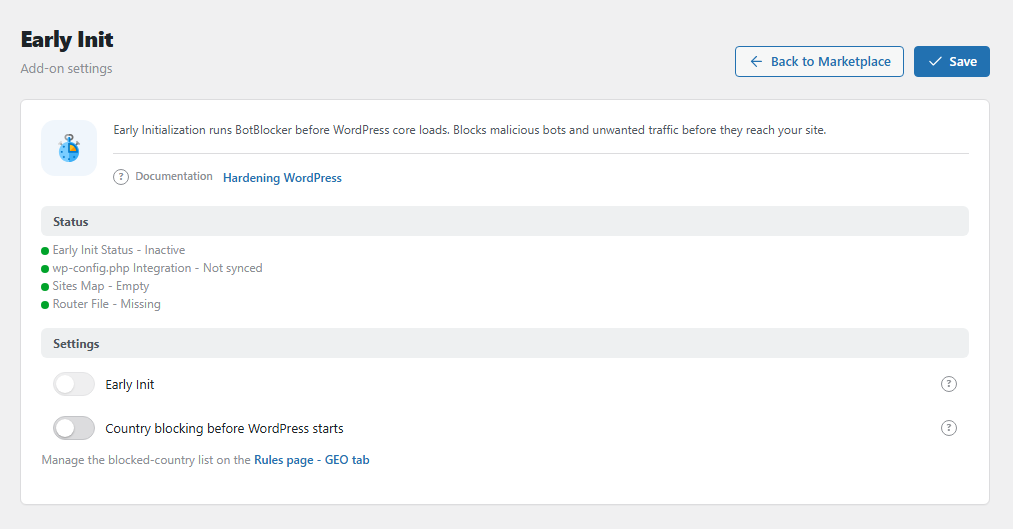
The Early Init panel. Open it from BotBlocker → Add-ons.
It needs a PRO license
Early Init works only with an active PRO license. Without it, the Early Init switch is locked. If the license ends, BotBlocker turns Early Init off by itself and removes its line from wp-config.php.
How the gate is built
To run before WordPress, BotBlocker needs a way in. It does 2 things for you:
- It puts a small routing file in your protected uploads folder.
- It adds a few lines to
wp-config.php. This is the main WordPress settings file, and it is the first file that WordPress reads. The lines load the routing file.
When you turn Early Init off, BotBlocker removes the lines again. BotBlocker checks the setup in the background when you use the admin area, and repairs it if needed.
The Status group in the panel shows the state of each part:
| Line | Good value | Meaning |
|---|---|---|
| Early Init Status | Active | The feature is on. |
| wp-config.php Integration | Synced | The lines are in wp-config.php. |
| Sites Map | Built | BotBlocker knows which site uses which data. On a single site, you see 1 site. |
| Router File | Deployed | The routing file is in place. |
A gray dot means that part is not ready.
What the gate checks
The gate reads the same IP rules that BotBlocker already uses. You do not make new rules. For each visit, it looks for the visitor's address:
- Address has a block rule: the visitor gets the 403 block page (a "no access" page). WordPress does not start.
- Address has an allow rule: the gate lets the visitor in.
- Anything else: the gate lets the visitor in. The full BotBlocker checks then run inside WordPress.
The gate only handles block rules. Gray rules (visitors who get a check) and dark rules (silent bans) still work, but inside WordPress, as before.
The gate also uses recent short bans, for example a 15-minute block from rate limiting, as long as they are active.
It never blocks your own tools
The gate always lets these requests through:
- When you paused BotBlocker with the Dashboard pause switch.
- When a visitor uses a valid emergency recovery link, and on the next pages of that session after Disable current check.
- WordPress scheduled tasks (
wp-cron.php) and the command-line tool WP-CLI. - Requests from WordPress to your own server.
If the gate has a problem, it steps back
Early Init changes a file outside the plugin folder. So it is built to fail safely. If the gate hits an error, it does not stop your site. BotBlocker turns Early Init off, removes the lines from wp-config.php, and shows you an alert. Your visitors then get the normal protection inside WordPress.
Fast cached pages for verified visitors
A page cache plugin saves a ready copy of each page and sends it to the next visitor. This makes your site fast. But the copy is sent before BotBlocker can check the visitor. Without Early Init, BotBlocker therefore stops pages from being cached at all, and your cache plugin has nothing to send.
With Early Init, the gate decides who may get a cached page:
- A visitor BotBlocker has verified gets a short-lived pass in a cookie. With this pass, the gate lets the cache plugin send the cached page. The visit is fast.
- A bot or an unverified visitor has no valid pass. The gate keeps the cache plugin out of the way. The visitor gets a fresh page, and BotBlocker checks them first, as usual.
The pass is signed and tied to the visitor's address. A visitor cannot make one up or reuse one from another address. When the pass ends, the next page is not cached for them: BotBlocker checks them again and gives a new pass.
This works with cache plugins that send cached pages through WordPress, and with BotBlocker's own Page Cache add-on. The note under the add-on description shows if Page Cache is active and links to its settings, or to the Add-ons page if it is not.
It does not cover a cache that is sent before WordPress starts: cache rules in .htaccess or in the server configuration, server caches such as LiteSpeed, nginx or Varnish, and CDN page caching. Such a cache can still send a page to anyone.
Only one early layer at a time
Early Init and MU mode both try to run BotBlocker early. They cannot run together. When you turn one on, BotBlocker turns the other off. Read Early phase and MU mode to pick the right one.
Settings
You also find the Early Init switch in BotBlocker → Settings → System → Early Phase. Both places change the same setting. The other settings are only on this page.
Settings
Early Init
Default: On after activation (needs a PRO license)
The main switch. When you turn it on, BotBlocker sets up the gate: it adds the routing file and the lines in wp-config.php. When you turn it off, BotBlocker removes the lines.
- On: visitors with a block rule are refused before WordPress starts.
- Off: BotBlocker checks all visitors inside WordPress. The protection is the same, but each blocked visit costs more work.
Before you turn it on, check with your host that wp-config.php can be changed. Some hosts manage this file and write over it. Then the gate stops working, and BotBlocker turns it off again.
If you turn Early Init off, clear your page cache. Without the gate, pages cached while it was on would go to every visitor without BotBlocker checks. The panel shows this reminder under the switch while Early Init is on. You clear the cache in your cache plugin, for example with its Delete cache or Purge all button.
Country blocking before WordPress starts
Default: Off
Applies your blocked-country list at the gate. A visitor from a blocked country is refused before WordPress loads. So a block for a whole country costs your site almost nothing. You manage the country list on the Rules page, GEO tab. See GEO and ASN rules.
How the gate finds the country:
- It reads the country that your CDN sends, for example the
CF-IPCountryheader from Cloudflare. A CDN (content delivery network) is a service in front of your server. - If there is no such header, it looks up the address in the local country database.
When the gate is not sure of the country, it lets the visitor in, and the normal checks decide. An address with an allow rule is never blocked by country.
Be careful: a country block refuses many people at once. Before you keep this on, check that your own country, your customers, and search engines still get in. If your site is not behind a CDN, a visitor can fake the country header. Read Network connection types to learn more.
Page caching
Cached pages for verified visitors
Default: On
Lets your cache plugin send cached pages to visitors BotBlocker has verified, as described in Fast cached pages for verified visitors.
- On: verified visitors get fast cached pages. Everyone else gets a fresh page and is checked first.
- Off: BotBlocker stops pages from being cached at all, as without Early Init. No cached page can skip the checks. The site is slower, but safe.
Turn it off only if a cache plugin misbehaves. After you turn it off, clear your page cache. Pages cached while it was on would otherwise go to everyone without BotBlocker checks. The panel shows this reminder under the switch.
Re-check verified visitors every
Default: 15 minutes
How long a verified visitor can browse cached pages before BotBlocker checks them again. You can pick 1 minute, 5 minutes, 15 minutes, 30 minutes or 1 hour.
- Shorter: a visitor who becomes a problem, for example who gets a ban, is stopped sooner. More pages load without the cache.
- Longer: the site is faster, but visitors are checked less often.
If you are locked out or the site acts strangely
- Your site acts strangely after you turn it on? Turn Early Init off in the panel. This also removes the lines from
wp-config.php. - You cannot open the admin area? Use your emergency recovery link. The gate always lets it through.
- Nothing works? Open
wp-config.phpwith your host's file manager. Remove the BotBlocker lines that loadbbcs-early-router.php. Or ask your host to do it. - A real visitor is blocked? Look at the IP rules. The gate only blocks addresses with a block rule, or countries from your list. Remove or change the rule.
- The switch is locked? The PRO license is not active. Connect it first. See Plans and licensing.
- Visitors never get cached pages? Check that Cached pages for verified visitors is on and your cache plugin is active. The first page after a check is never cached; the cache starts from the next one.
- Bots still get cached pages? Your server or CDN sends a cache without WordPress. The gate cannot see these visits.
- The status shows "Not synced" or "Missing"? Open any admin page. BotBlocker repairs the setup. If it stays like this, your host may not allow changes to
wp-config.php.