DDoS and intermediary resilience
Keep BotBlocker's check page working when your site sits behind a DDoS shield, WAF or CDN.
Many sites have a service in front of them: a CDN, a web application firewall, a DDoS protection service such as DDoS-Guard or Stormwall, or Cloudflare's Under Attack Mode. These services are useful, but they do not know about BotBlocker. They can catch BotBlocker's own background request, answer it with their own challenge, or keep a copy of a page that must never be cached.
When that happens, the visitor gets stuck. The check page spins, reloads, or shows the check again and again. BotBlocker already handles part of this on its own, and the Server DDoS Protection Support switch adds more.
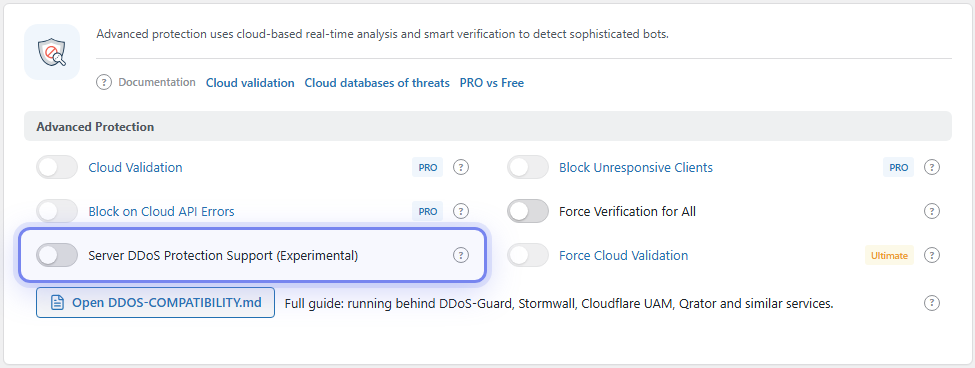
The Server DDoS Protection Support (Experimental) switch. Open it from BotBlocker → Settings → System → Advanced Protection.
Why the check page can break
When a visitor gets BotBlocker's check page, the page sends a short background request to your site. Your site answers with a result, and the browser gets its pass cookie. A DDoS service in front of the site may catch that request and send back its own challenge instead of your site's answer. The browser does not get the result it expects, so the check fails.
What BotBlocker always does
This part works for every site, with the switch off. When the answer is a DDoS service challenge and not BotBlocker's result, BotBlocker:
- takes the service's cookie from the challenge and sets it in the browser;
- tries again up to 3 times, waiting 1, 2 and then 3 seconds;
- if all tries fail, reloads the original page, because the service cookie is now set. It stops after 2 reloads and shows the check again, so the visitor is never caught in an endless loop.
This handles most simple DDoS shields. It does not handle services that ask the browser to solve a puzzle or a CAPTCHA, or that send the request to another page. For those, the service must let BotBlocker's request pass. The guide behind the Open DDOS-COMPATIBILITY.md button shows the settings for DDoS-Guard, Stormwall, Cloudflare and Qrator.
What the switch adds
The Server DDoS Protection Support switch makes the check stricter and calmer when something in front of the site interferes:
- Signed answers. BotBlocker adds a signature to its result. The browser accepts the pass cookie only from an answer that has this signature. An answer without it, for example an old cached answer from a service in between, cannot hand out a pass.
- A circuit breaker. After 3 failed checks in a row, the page stops trying for 30 seconds and shows "Verification is temporarily unavailable" with a countdown. This stops the page from hitting a broken path again and again, and from adding load during an attack.
- Stronger no-cache headers. BotBlocker adds headers that tell CDNs and proxies not to store the check page.
- A clearer page. The visitor sees "verifying" and "retrying" messages instead of a blank wait.
Test it before you trust it
The switch is experimental, so try it in a controlled way:
- Open your site in a private window through the real path, the way visitors reach it. Pass the check and browse a few pages.
- If you can, open the same site through a direct address that skips the service. If the check works directly but fails through the service, the service is the cause.
- Turn the switch on and repeat step 1.
- Also test admin login and any important callback, such as a payment provider (see Payment callbacks).
Settings
One setting belongs to this feature, in the Advanced Protection group.
Advanced Protection
Server DDoS Protection Support (Experimental)
Default: Off
Adds signed answers, a circuit breaker and stronger no-cache headers to the check page. See What the switch adds.
- On: use it when the check page loops or fails only through your DDoS service, WAF or CDN.
- Off: keep it off when the check page already works. The automatic retries above still run.
If new problems start after you turn it on, turn it off and test again before you change anything else.
When something goes wrong
- The check page loops only through the service? Turn the switch on. If it still loops, add a bypass for
admin-ajax.phpin your service, as the DDOS-COMPATIBILITY.md guide shows. - Visitors see "Verification is temporarily unavailable"? The circuit breaker is open after 3 failures. The path to your site is broken. Check the service in front of it.
- Problems start after you turn the switch on? Turn it off and test again.
- A visitor is refused, but nothing is in BotBlocker's log? The service in front of the site refused them. BotBlocker never saw the visit. Check the service's own log.
- The check page is shown from a cache? Read Cookies and sessions and the Cache tab in BotBlocker → Integrations.
- The check fails even on a direct path? The cause is elsewhere. Read Verification overview and When the site is behaving badly.
- You are locked out? Use Emergency recovery secrets.