Advanced and recovery overview
The special tools for special cases: stricter checks, help behind a CDN or firewall, and a way back in when you are locked out.
Most sites work well with the normal BotBlocker settings, but a few need more. A CDN, a web application firewall, or a DDoS service can sit in front of your site and change BotBlocker's checks on the way. Some sites need stricter checks than the defaults. And any site can have a bad day, when a rule locks out the owner.
Each tool below solves one specific problem. None of them is a "stronger" button to turn on just in case: without the problem they solve, they make your site depend on more services, or they show more checks to real people.
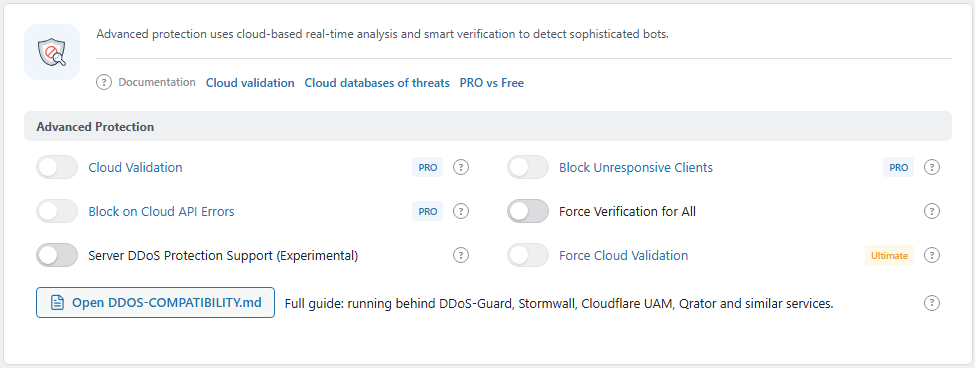
The Advanced Protection group. Open it from BotBlocker → Settings → System → Advanced Protection.
The pages in this section
| Page | Read it when |
|---|---|
| Stricter checks | You want tighter verification than the defaults. |
| DDoS and intermediary resilience | Checks fail only behind your CDN, firewall, or DDoS service. |
| Emergency recovery secrets | You are locked out, or you want to store your recovery links now. |
| When the site is behaving badly | Something is wrong, and you do not know where to start. |
What each Advanced Protection switch costs
The Advanced Protection group has six switches. Each has a price. This table shows it. The full explanation is on the linked page.
| Switch | Default | What you pay when you turn it on |
|---|---|---|
| Cloud Validation (PRO) | Off | Suspicious requests go to BotBlocker Cloud for a second opinion. Your site then depends on the cloud for those visitors. See Stricter checks. |
| Block Unresponsive Clients (PRO) | Off | When Cloud Validation is on, a gray or bad cloud answer fails the automatic check. If the cloud does not answer, the local checks decide. See Stricter checks. |
| Block on Cloud API Errors (PRO) | Off | When the cloud sends an unexpected answer, the visitor is blocked instead of let through. A cloud problem becomes a problem for your visitors. See Cloud API. |
| Force Verification for All | Off | Every visitor gets a CAPTCHA, and the other checks are skipped. Good for a short emergency, hard on real visitors. See Stricter checks. |
| Server DDoS Protection Support (Experimental) | Off | Adds response signing, a circuit breaker, and transport hardening to the verification flow. It helps when a service in front of the site interferes, and it can cause problems when nothing interferes. See DDoS and intermediary resilience. |
| Force Cloud Validation (Ultimate) | Off | Every visitor is checked with the cloud database. Your whole site depends on the cloud. See Cloud API. |
The PRO switches are locked until you have an active PRO license. Force Cloud Validation needs the Ultimate plan.
Before you change anything here
- Keep a way back in. Store your recovery links, and know where the pause switch on the Dashboard is.
- Change one switch at a time.
- Write down what you changed and when. If a problem shows up a day later, you know where to look.
When something goes wrong
- Problems start after you turned on a switch here? Turn that switch off again, and test before you try anything else.
- Checks fail only behind your CDN or firewall? Read DDoS and intermediary resilience. The service in front of your site may cache or change the check.
- Visitors are blocked when the cloud has problems? Turn off Block on Cloud API Errors, and read Cloud API.
- You are locked out? Use the links in Emergency recovery secrets.
- You do not know what is wrong? Start with When the site is behaving badly.