Early phase and MU mode
Stop blocked visitors before WordPress does the heavy work, and save server power on every bad request.
Each request to a WordPress site costs work. WordPress starts, loads every plugin and the theme, and connects to the database. Only then does a normal plugin see the visitor. If that visitor is a bot on your block list, all that work was for nothing. With a lot of bot traffic, this waste makes your site slow.
BotBlocker can move its IP block and allow lists to an earlier point in this process. MU mode checks the lists before the normal plugins load. Early Init checks them even before WordPress itself starts. A blocked visitor is refused at once, and your server saves the rest of the work. All other visitors continue to the full BotBlocker protection, as usual.
Both modes put files outside the plugin folder. So this page also tells you how to turn them off safely.
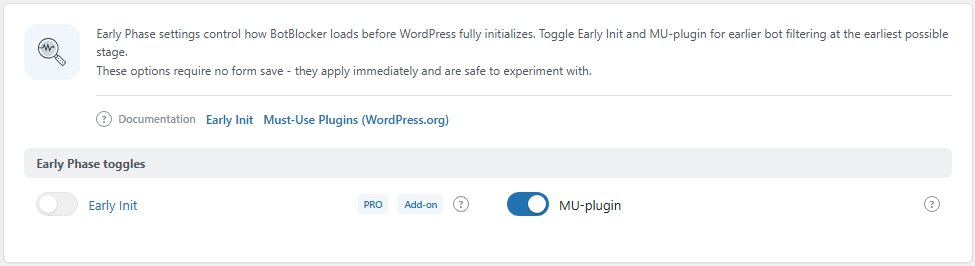
The Early Phase toggles group. Open it from BotBlocker → Settings → System → Early Phase.
Three places where BotBlocker can check a visitor
BotBlocker can check a visitor at three points, in this order:
- Early Init runs from a line in
wp-config.php, before WordPress starts. It is the cheapest place to refuse a visitor. - MU mode runs as a must-use plugin, after WordPress starts but before the normal plugins load.
- The normal plugin runs last. Here BotBlocker has all of WordPress available, and it runs all its checks: CAPTCHA, rate limiting, browser checks, and more.
The two early points check only your IP block and allow lists (and, if you want, your country list). They are fast because they use ready-made files and do not need the database. Every visitor who is not refused there still goes to the normal plugin for the full check.
MU mode is on from the start
A new BotBlocker install turns on MU mode by itself. BotBlocker puts a small loader file, botblocker-mu-plugin.php, into wp-content/mu-plugins. WordPress loads every file in that folder on each request, before normal plugins. The loader then loads the main BotBlocker code. So most sites get early IP blocking without any setup.
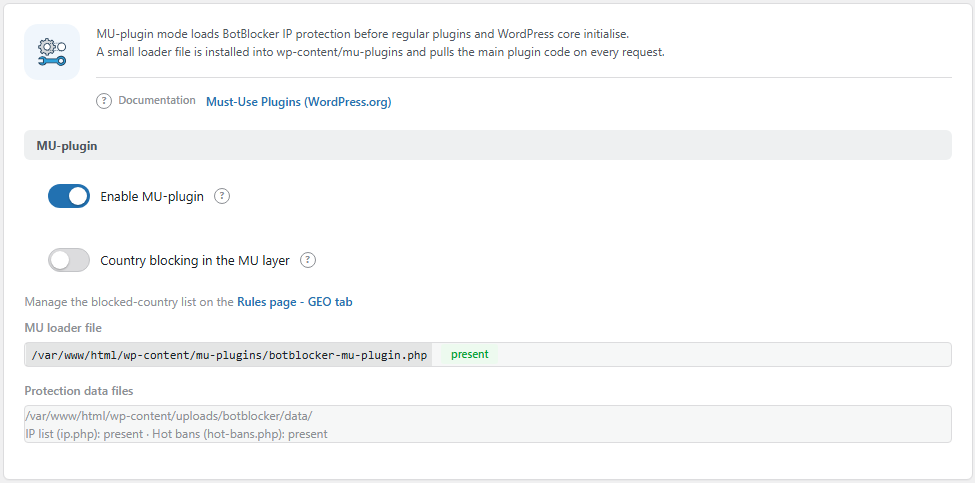
The MU-plugin panel. Open it from BotBlocker → Integrations → MU-plugin.
The panel shows the path of the loader file and a status for each file that MU mode needs: the loader, the IP list (ip.php), and the hot bans (hot-bans.php). Each shows present or missing. If a file is missing, MU mode cannot do its job.
Early Init goes one step earlier
Early Init is a PRO add-on. It needs an active PRO license and the Early Init add-on on BotBlocker → Add-ons. Without both, BotBlocker refuses to turn it on.
When you turn it on, BotBlocker adds an include line to wp-config.php. That line loads a small routing file before WordPress starts. When you turn it off, BotBlocker removes the line again. So WordPress must be able to write to wp-config.php. If it cannot, BotBlocker shows "Failed to write to wp-config.php".
Only one early mode at a time
Early Init and MU mode do the same job at different points. They cannot run together. When you turn one on, BotBlocker turns the other off:
- Turn on Early Init, and MU mode goes off.
- Turn on Enable MU-plugin, and Early Init goes off.
Which one to pick? MU mode is free, it is already on, and it needs no change to wp-config.php. Early Init goes further: it refuses a blocked visitor before WordPress itself starts, so WordPress never loads for that visitor. On a site with a lot of bot traffic, this saves a lot of time and cuts your server load massively. Pick it if your host lets WordPress write to wp-config.php.
The switches work at once
The Early Phase switches do not use the normal Save button. They apply as soon as you click them. BotBlocker writes or removes the files at that moment, and records the change in the audit log.
Settings
Early Phase toggles
These switches choose where the early check runs. You find them on BotBlocker → Settings → System → Early Phase. Enable MU-plugin is also on BotBlocker → Integrations → MU-plugin. Both places change the same setting.
Early Init
Default: Off
Checks your IP block and allow lists before WordPress starts. It adds an include line to wp-config.php when you turn it on, and removes it when you turn it off.
- On: blocked IP addresses are refused before WordPress loads. MU mode turns off.
- Off: no line in
wp-config.php. The early check runs in MU mode, if it is on.
It needs a PRO license and the Early Init add-on. If your host manages wp-config.php for you, ask them before you turn it on. More details are in Early Init.
Enable MU-plugin
Default: On
Checks your IP block and allow lists as a must-use plugin, before the normal plugins load. BotBlocker installs the loader file when you turn it on, and deletes it when you turn it off.
- On: blocked IP addresses are refused before other plugins and the theme load. Early Init turns off.
- Off: the loader file is removed. IP lists are checked later, in the normal plugin.
If BotBlocker shows "Failed to install MU plugin", WordPress cannot write to wp-content/mu-plugins. Ask your host to check the folder permissions.
Country blocking in the early layers
These switches let an early mode also refuse visitors from the countries on your blocked-country list. You manage that list on BotBlocker → Rules → GEO; see GEO and ASN rules.
Country blocking before WordPress starts
Default: Off
Refuses visitors from blocked countries in the Early Init layer, before WordPress loads. You find this switch in the Early Init add-on panel on BotBlocker → Add-ons. It works only when Early Init is on.
- On: a visitor from a blocked country costs your server almost nothing.
- Off: country rules are checked later, in the normal plugin.
Country blocks are broad. Before you turn this on, make sure that your own country, your customers, and the search engines you need are not on the list.
Country blocking in the MU layer
Default: Off
Refuses visitors from blocked countries in the MU layer, before the normal plugins load. You find this switch on BotBlocker → Integrations → MU-plugin. It works only when MU mode is on.
If BotBlocker is not sure about a visitor's country, it does not refuse them here. It sends them on to the normal plugin, which decides with the full data. So an unclear lookup never blocks a real visitor in this layer.
When something goes wrong
- The site acts strangely right after you turned on an early mode? Turn that switch off. For Early Init, this also removes the line from
wp-config.php. - You cannot open the admin area? Remove the BotBlocker include block from
wp-config.phpby hand (or ask your host), or deletewp-content/mu-plugins/botblocker-mu-plugin.php. Then use the pause switch or the emergency recovery links. - Early Init does not turn on? Check that the PRO license is active and the Early Init add-on is on. If you see "Failed to write to wp-config.php", ask your host for write access.
- The MU-plugin panel shows "missing"? Turn Enable MU-plugin off and on again. BotBlocker writes the files again.
- A visitor is refused and you cannot find why? Turn the early mode off, test again in the normal plugin, and read the reason in Traffic and audit logs. Then turn it back on.
- Updates, cron jobs, or the site's own requests fail? Check the self-connection settings in Where protection applies.