Where protection applies
Decide how much of your site BotBlocker checks, and who is trusted enough to skip the checks.
A request to your site is not always a person who reads a page. It can be a call to the REST API, an AJAX request from a form, a WP-Cron task, or a login attempt. Attackers use all of these doors, not only the public pages. If BotBlocker watches only the pages, the other doors stay open.
The broadest settings in BotBlocker decide which requests are checked, how often a verified visitor is checked again, and which logged-in people skip the checks. The defaults protect everything and suit most sites.
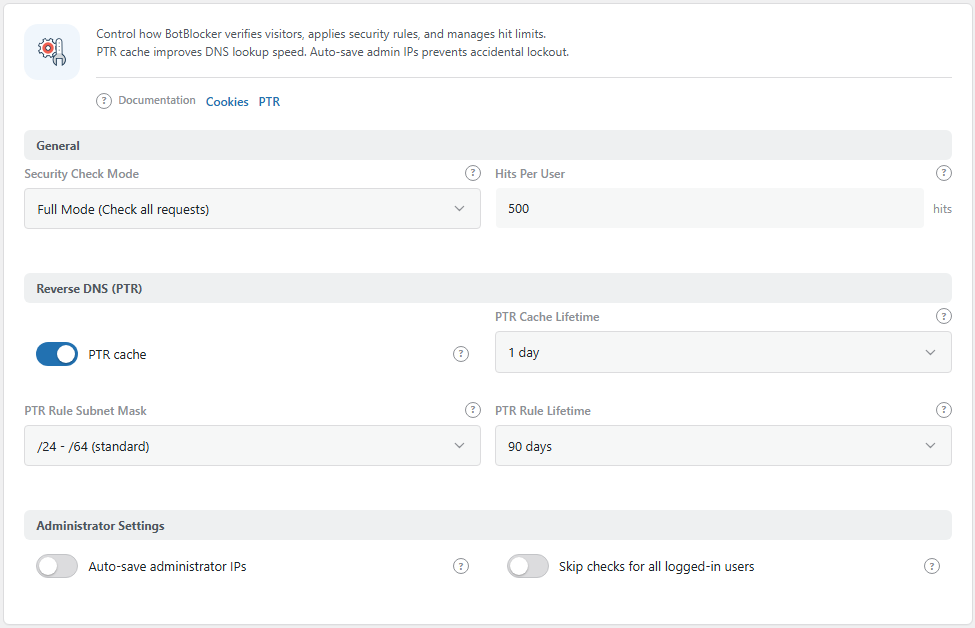
The General panel. Open it from BotBlocker → Settings → System → General.
Full Mode checks every door
Security Check Mode decides which requests BotBlocker checks:
- Full Mode checks all requests: public pages, admin screens, the REST API, AJAX, and cron. BotBlocker checks the request early, while WordPress is still loading. A bad request is stopped before WordPress does most of its work.
- Frontend Mode checks only the public pages. Requests that do not show a page, like API or AJAX calls, are not checked.
Full Mode is the default for new installations, and it is the one to keep. Login attacks, API probing, and spam through AJAX forms all arrive through the doors that Frontend Mode does not watch.
Trusted people skip the checks
BotBlocker never checks logged-in users with these roles: administrator, editor, moderator, and shop manager. They manage the site, and checks would only get in their way.
Other logged-in users, for example subscribers and customers, are checked like any visitor. The Skip checks for all logged-in users setting changes that.
WordPress itself also needs to talk to your site: cron tasks, updates, and other requests from your own server. Those are handled by the self-connection settings in Network connection types.
Services that must always get through
Not every visitor is a person. Uptime monitors, payment providers, webhooks from other services, backup tools, and apps that talk to your site through the REST API all send requests too. They have no browser and no cookie, so they cannot pass a check.
This is why it matters: to BotBlocker, such a service can look like a fast bot. It gets a check page it cannot solve. If it sends many requests, Rate limiting blocks its address for a while. Nothing shows on your site, but the service stops working in silence. Your monitor reports that the site is down, an order stays "pending", or an app cannot log in.
BotBlocker already lets through verified search engines and your own server. Other services it cannot know about, so you must tell it:
- Add the service address to your allow list in IP lists. An allowed address skips the checks and rate limiting. Most services publish their addresses in their help pages.
- For payment providers, use Payment callbacks. These settings let the callbacks through without a wide open door.
Do this when you install BotBlocker, not after something breaks. If a service already stopped working, look for its address in the log.
Verified visitors are checked again after a while
After a visitor passes the check, BotBlocker counts their requests. When the count goes over Hits Per User (500 by default), BotBlocker clears the pass, and the visitor must pass the check again. This stops a bot that passed once from using that pass forever.
Only real page activity counts: opening a page, sending a form. Images, styles, scripts, and fonts do not count.
Other settings on the General panel
The General panel also has the Reverse DNS (PTR) group. Those settings control how BotBlocker confirms real search engine bots. They are explained in Reverse-DNS cache.
Related topics have their own pages: Network connection types, Blocks and responses, Search and referrer behavior, and Stricter checks. The Early Init add-on moves some checks even earlier, before WordPress starts.
Settings
General
Which requests BotBlocker checks, and how often it checks a verified visitor again.
Security Check Mode
Default: Full Mode (Check all requests)
Chooses which requests BotBlocker checks.
- Full Mode (Check all requests): public pages, admin, REST API, AJAX, and cron. Checks happen early, while WordPress loads.
- Frontend Mode (Check frontend only): public pages only. Checks happen later, just before the page is shown.
Keep Full Mode. Frontend Mode is a legacy option. Do not use it, not even for a test.
In Full Mode, a rule that is too strict can also block you from the admin area. Have the Emergency recovery secrets links ready before you tighten your rules.
Hits Per User
Default: 500 hits
How many requests a verified visitor can make before they must pass the check again. The lowest value is 1.
- Lower number: bots that passed a check lose their pass sooner, but real visitors see the check more often.
- Higher number: real visitors are checked less often, but a bot that passed once can do more before the next check.
Raise it if real visitors of a shop, a search page, or a large gallery see the check page again while they browse. Lower it only if your reports show visitors who pass the check and then make hundreds of requests.
Administrator Settings
Keep the people who run the site from locking themselves out.
Auto-save administrator IPs
Default: Off
When an administrator, editor, moderator, or shop manager uses the site, BotBlocker saves their IP address as a permanent allow rule with the comment "Admin IP". You find these rules on BotBlocker → Rules.
- On: your address is always allowed. A rule that is too strict cannot lock you out while you work from that address.
- Off: no address is saved automatically.
Be careful: the allow rule is for the address, not for your account. Everybody who uses that address later also skips the checks, even when they are not logged in. Home addresses change, and offices, hotels, and VPNs are shared. The rules do not expire. If you turn this on, check the "Admin IP" rules from time to time and delete old ones.
Skip checks for all logged-in users
Default: Off
Lets every logged-in user skip the BotBlocker checks, not only the trusted roles.
- On: subscribers, customers, authors, contributors, and all other logged-in users skip the checks.
- Off: only administrators, editors, moderators, and shop managers skip the checks. Other logged-in users are checked like visitors.
Turn it on if your members or customers see the check page too often. Keep in mind that bots can also register accounts or use stolen ones. On a site with open registration, a bot only needs to sign up to skip every check.
When something goes wrong
- Nobody can reach the site after a change? Pause protection on the Dashboard, or use the links in Emergency recovery secrets. Undo the change, then turn protection back on.
- Updates, cron tasks, or other background work fail? Check the self-connection settings in Network connection types. If the Early Init add-on is on, see Early phase and MU mode too.
- The admin area or an API connection stops working? Open BotBlocker → Reports and find the blocked request. The decision sentence tells you which rule blocked it. Fix that rule. See Investigating one visitor, step by step.
- Members or customers see the check page too often? Raise Hits Per User, or turn on Skip checks for all logged-in users.