External services that receive data
See every outside service BotBlocker can talk to, what it sends, and when.
Some checks cannot be done by your site alone. A captcha needs a provider that sees traffic from all over the web. A shared reputation answer comes from BotBlocker Cloud. A comment score comes from a language model. Each of these exchanges sends some data off your server.
Most of these services are off until you turn them on or install an add-on. Below is what each one sends, and when. What stays on your own server is described in Privacy and data.
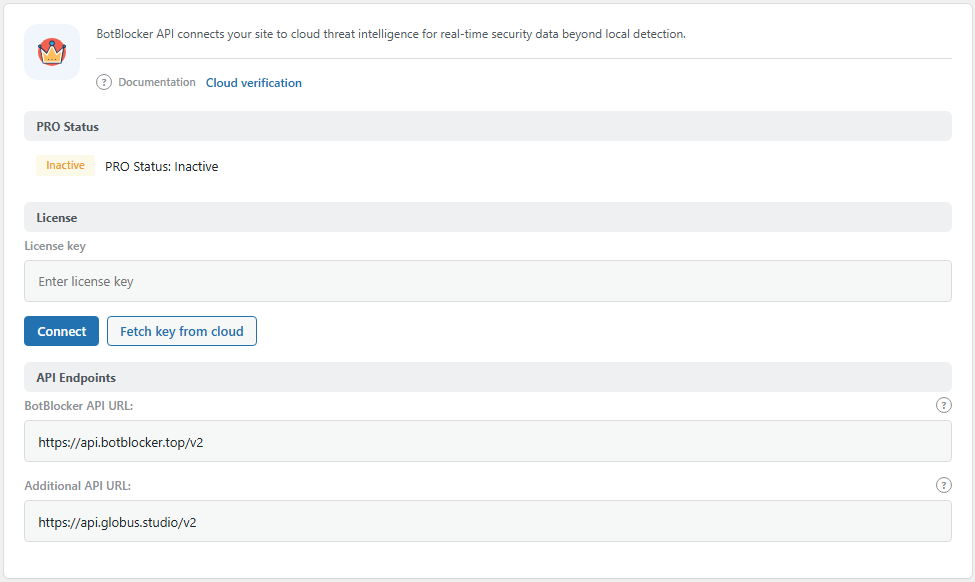
The BotBlocker Cloud tab. Open it from BotBlocker → Integrations → BotBlocker Cloud. Other providers have their own tabs or add-on panels.
BotBlocker Cloud
BotBlocker Cloud pools what many sites see. Every site uses it, also without a license: it keeps the lists of trusted crawlers, AI crawlers, and TLS fingerprints up to date. The check of single visitors is a PRO feature. It runs only when the site is connected and Cloud Validation is on (see Cloud API).
During a visitor's check (PRO, with Cloud Validation on), BotBlocker sends: the IP address and its host name, the user agent, the referrer, accepted languages and accept header, country (and the country from Cloudflare, when present), time zone, screen and window sizes, colour depth, the ad-blocker result, the reCAPTCHA v3 score when one exists, browser fingerprint details from the check, and your account credentials. The reply is a status and a score. BotBlocker keeps the reply for one day, so a returning visitor is not sent again during that time.
On a schedule, on every site, BotBlocker sends batches of IP addresses it judged suspicious, for the shared reputation data. It also asks the Cloud for trusted crawler ranges, TLS fingerprints, AI crawler lists, and your remaining quota, and it validates or fetches your license key when you connect.
Google reCAPTCHA
When a reCAPTCHA mode is on, the visitor's browser loads Google's script, so Google sees the visitor's request directly. BotBlocker then checks the answer on the server. It sends Google the answer token, your secret key, and the visitor's IP address. For reCAPTCHA v2 it also sends the visitor's user agent; for v3 it sends the visitor's referrer. v2 runs on the check page; v3 runs during each automatic check.
hCaptcha and Cloudflare Turnstile
The hCaptcha and Turnstile add-ons work the same way. The visitor's browser loads the provider's widget. BotBlocker then sends the provider the answer token, your secret key, and the visitor's IP address. If the provider cannot be reached, the check page falls back to the built-in challenge instead of blocking the visitor.
The AI comment check
The AI Anti-Spam Comments add-on sends the text of a comment to a language model service for a spam score. A commenter can type anything, including names, email addresses, or health details, so the comment content itself leaves your site. In instant mode the comment is sent while it is submitted. In batch mode comments are collected and sent in groups on a schedule.
Telegram and Pusher
The Telegram Reports add-on sends a weekly summary of requests, blocks, and bots to a chat you choose. It sends the report text with your bot token and chat ID. The Pusher Digest add-on sends the same kind of weekly digest through Pusher Channels, signed with your app secret. Both send summary numbers, not single visitor records, and neither runs during a visitor's request.
Malware Scanner downloads
The Malware Scanner add-on downloads a malware signature list (the BotBlocker feed by default, and you can change the address). To compare your files with the originals, it downloads WordPress core checksums and, for plugins and themes from WordPress.org, the original packages. No visitor data leaves your site, but those servers see your server's IP address.
Reverse DNS lookups
To find the host name of an IP address, BotBlocker asks your server's DNS resolver (reverse DNS). That resolver sees the IP address being looked up. This is the same kind of query your server makes every day. The PTR cache reduces how often it happens.
Activation, support, and feedback
When you activate the plugin, BotBlocker sends the vendor the site address and an administrator email. When you use the support form, it sends the site domain, your name, your email, and the message. When you send deactivation feedback, it sends the reason, your note, the site address, and the first activation time. These are actions you take yourself; visitors are not involved.
At a glance
| Service | What is sent | When |
|---|---|---|
| BotBlocker Cloud | Visitor signals and account credentials; suspicious IP batches; sync and account requests | During checks when Cloud Validation is on; on schedule |
| Google reCAPTCHA | Answer token, secret key, IP address, user agent (v2) or referrer (v3) | Each reCAPTCHA check |
| hCaptcha | Answer token, secret key, IP address | Each hCaptcha check |
| Cloudflare Turnstile | Answer token, secret key, IP address | Each Turnstile check |
| AI comment check | Comment text | On submit, or in batches |
| Telegram | Weekly report text, bot token, chat ID | Weekly |
| Pusher | Weekly digest signed with app secret | Weekly |
| Malware Scanner sources | No visitor data; your server downloads files | During a scan or feed update |
| DNS resolver | IP address being looked up | On reverse DNS lookups |
| Vendor (activation, support, feedback) | Site address, email, message text | When you activate or send a message |
Staying in control
- Each switch changes who receives data. Cloud Validation, a captcha provider, and the AI comment check each send data only while they are on.
- Captcha providers see the visitor's browser directly. This is how these services work.
- Data already sent stays with the provider. Clearing data in BotBlocker does not delete it there. That depends on your account with the provider.
- Not sure whether a service is active? Open its panel. A captcha provider is used only when it is selected. The Cloud receives visitor signals only when the site is connected and Cloud Validation is on. The AI comment check, Telegram, and Pusher work only when their add-ons are active.