Performance and storage
Keep your site fast and your database small while BotBlocker protects it.
Every security check is a little work, and BotBlocker does it on each visit, before your theme builds the page. Most of this work is quick: BotBlocker compares the visit with your rules, and that takes almost no time. The slow parts are the questions it must ask outside your server, such as a reverse DNS lookup or a BotBlocker Cloud check. The other cost is storage: the visit log and the audit log grow with your traffic.
BotBlocker handles both. It remembers slow answers so it asks each question only once, it can refuse bad visitors before WordPress does its heavy work, and it deletes old log records by itself. Each control has its own page, and they work together as your site grows.
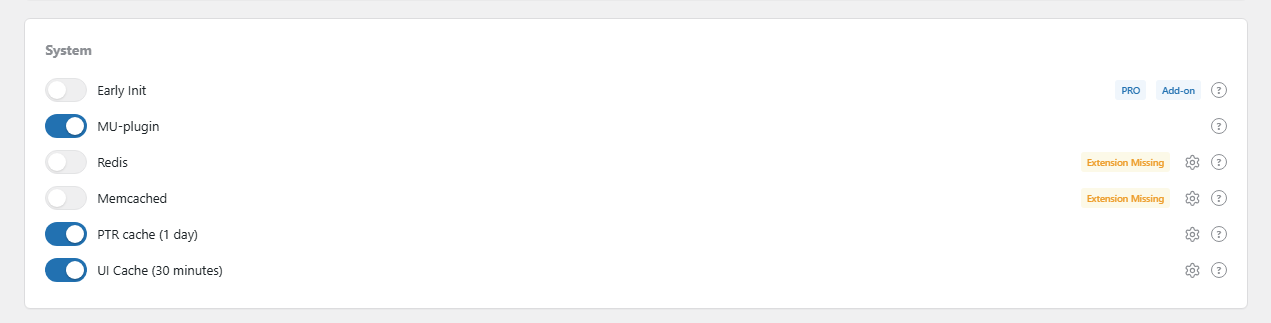
The Health Status page shows which caches are on. Open it from BotBlocker → Health Status.
Where the time goes
A visit runs through a series of steps. BotBlocker's own steps are fast. A visit becomes slow only when a step waits for something:
- Outside answers. A reverse DNS lookup, a country lookup or a Cloud reply needs a network round trip. BotBlocker keeps these answers in a cache, so the next visit reuses them. See Cache backends.
- Search bot checks. Each fake-or-real bot check needs a DNS lookup. The Reverse-DNS cache keeps the names, and it adds an allow rule for each verified bot network, so later visits skip the lookup.
- Writing the log. Each visit that a logging category records is one more database write. You choose the categories in Traffic and audit logs.
- Admin pages. The Dashboard and Reports count the stored log. The interface cache keeps a ready copy of those numbers for 30 minutes by default. See Interface Caching.
Refuse bad visits earlier
A refused visit is cheaper than a served one, and it is even cheaper when WordPress does not load at all. BotBlocker has three ways to move the refusal earlier:
- Early phase and MU mode runs BotBlocker before other plugins load.
- The Early Init add-on checks your IP block rules at the very start of the visit.
- The Firewall Export add-on writes your ban list for your web server, so known attackers never reach PHP.
The Speed Up add-on helps from the other side: it removes WordPress extras that your pages do not need.
What grows over time
Caches do not grow without limit. Every entry has an expiry time, and old entries go away by themselves. Reference data, such as the network-owner (ASN) database, is replaced when it is updated, so it keeps about the same size.
The logs are what grow. With the defaults, BotBlocker keeps the visit log for 7 days and the audit log for 7 days, and a background task deletes older records. More logging categories or a longer retention means more rows. On a busy site, a large log makes the Dashboard and Reports slower to build. Keep the retention as long as your longest review, and no longer. You set both in BotBlocker → Settings → Data → Data Log & Processing.
Where to tune it
| What | Where |
|---|---|
| Admin page cache | BotBlocker → Settings → System → UI Settings |
| Redis, Memcached, APCu, Transients | BotBlocker → Integrations |
| Reverse DNS cache | BotBlocker → Settings → System → General |
| What is logged | BotBlocker → Settings → Data → Logging |
| How long logs are kept | BotBlocker → Settings → Data → Data Log & Processing |
| Clear caches, clean the database | BotBlocker → Tools → Maintenance |
Common problems
- The site is slow during a lot of bot traffic? Stop the bots earlier. Tighten Rate limiting, or refuse known attackers before WordPress starts with Early Init or Firewall Export.
- Only admin pages are slow? Check that Cache Plugin Interface is on, and shorten the log retention if the log is very large.
- The site got slower after you turned on Redis, Memcached or APCu? The service may not answer. Check it in Cache backends, or turn it off.
- The database keeps growing? Look at the logging categories and the retention in Traffic and audit logs. Then use Repair and Optimize Database in Tools and maintenance.
- Visitors see the check page again and again? That is a page cache or CDN problem, not a speed problem. Read Cookies and sessions.
- Do not turn off protection to gain speed. A paused BotBlocker is faster only because it lets everything in.