Country and ASN rules
Stop a whole source of bad traffic at once, not one address at a time.
Some bad traffic has no fixed address. A scraper moves from one address to the next, and a spam campaign uses thousands. But the source often stays the same: one country that your audience never comes from, or one hosting company that exists to rent servers to bots. If you block single addresses, you always stay one step behind.
The GEO tab blocks countries, and the ASN tab acts on whole networks. An ASN (autonomous system number) is the number of the network that owns an address, for example a hosting company or an internet provider. These rules are broad, and that is their power. But a country or a network also has real people in it, so use these rules with care. They have no end date. They stay until you remove them.
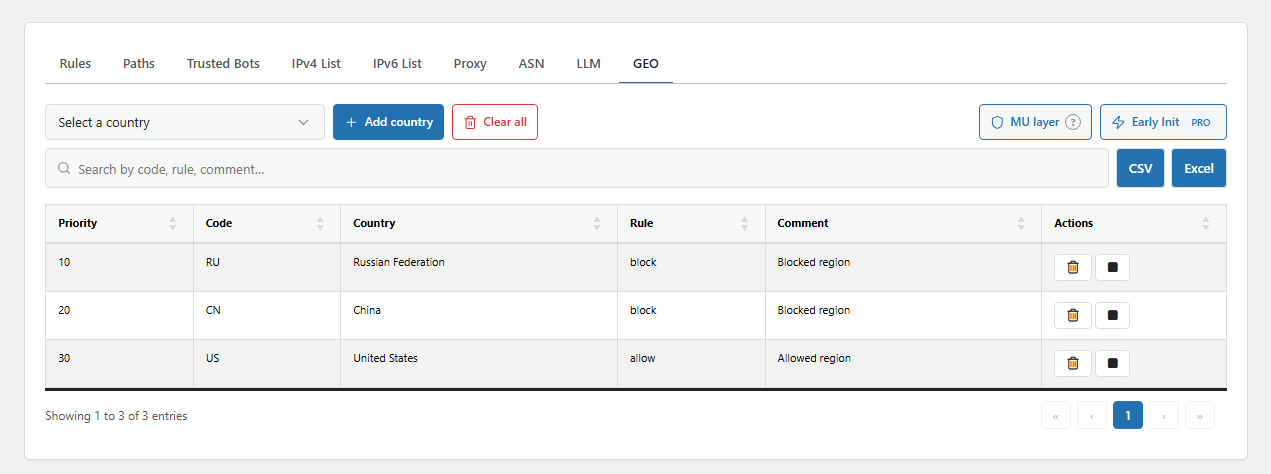
The GEO tab. Open it from BotBlocker → Rules → GEO.
Country blocks work in an early layer
This is the most important fact about the GEO tab: the GEO list alone blocks nobody. It is only a list. A country block takes effect when you turn on one of the early layers:
- Country blocking in the MU layer checks the country before WordPress loads the plugins. Use the MU layer button on the GEO tab to open it.
- Country blocking before WordPress starts is part of the Early Init add-on (PRO). It checks even earlier. Use the Early Init button on the GEO tab to open it.
Both are explained in Early phase and MU mode. Because they act so early, they use little server time, also during an attack.
BotBlocker gets the country in two ways. First, it reads a country header from your CDN, for example CF-IPCountry from Cloudflare. If there is no header, it looks up the address in its local network database. When BotBlocker is not sure about the country, it lets the visitor continue to the normal checks. It never blocks on a guess. An exact address with Allow on your IP list is never blocked by country.
If you need a country rule inside the normal checks, for example to send visitors from a country to the check page instead of blocking them, use a Country rule on the Rules tab. See Rules and IP lists.
Network rules catch hosting traffic
Real people browse from home, office, and mobile networks. Most bots run on rented servers in data centers. So the network is often a good sign of automated traffic. An ASN rule acts on every address of one network.
ASN rules run in the normal checks, after the IP lists and before the Rules tab. The order is in Rules and IP lists. Unlike a country block, an ASN rule can do more than block: it can also allow, mark as suspicious, or send to the check page.
Below the table, the ASN database note shows how many networks BotBlocker knows and when the list was last updated. BotBlocker's cloud keeps this list up to date, and you cannot edit it. Use it to check who owns a network before you add a rule.
ASN rules also help the Trusted Bots tab. A trusted crawler can be checked by its network: an asn: entry on a trusted bot works only when the same network has an Allow rule here.
Settings
GEO
The GEO tab has no dialog. You use the toolbar above the table:
- Select a country shows each country with its name and two-letter code, for example "Germany - DE".
- Add country adds the selected country to the block list.
- Clear all removes all countries from the list, after a confirmation.
- MU layer and Early Init open the switches that make the list work.
Each row has a switch to turn the country off without deleting it, and a delete button. There is no priority to set.
ASN
These fields are in the Add ASN Rule dialog.
Priority
Default: 50
The position of the rule in the list, from 1 to 100. A lower number comes first. Each network normally has only one rule, so you rarely need to change this.
Rule
Default: Block
The action for a visitor from this network:
- Allow: the visitor goes through without more checks. BotBlocker ignores this rule for a visitor that another check already marked as suspicious.
- Gray: the visitor is marked as suspicious, and the later checks are stricter.
- Dark: the visitor goes to the check page. People can pass it, bots usually cannot. This is a good middle way for a network with both.
- Block: the visitor is refused.
An Allow rule trusts everybody in the network, including anybody who rents a server there. Use it only for a network that you or a trusted partner control.
ASN Number
The network number, as digits, for example 13335. You can also type AS13335. BotBlocker keeps only the digits. Check the number in the ASN database note or a public lookup tool before you save.
AS Name
An optional name for the network, for example "Cloudflare". BotBlocker does not use it for matching. It only makes the table easier to read.
Comment
A note about why you added the rule and what traffic you saw. Because the rule never expires, this note helps you decide later if it is still necessary.
When something goes wrong
- You added a country, but its visitors still get in? Turn on Country blocking in the MU layer or the Early Init country switch. The GEO list does nothing without them. If your site is not behind a CDN that sends a country header, check that the ASN database note shows a downloaded database.
- Visitors from one region say they are refused? Look for their country on the GEO tab. Switch it off to test.
- You are refused while you travel or use a VPN? A country block affects you too. Use the links in Emergency recovery secrets, then add your address as Allow on the IP lists.
- A partner or a service lost access? Look for its network on the ASN tab. If the block was for a hosting company, block the exact addresses on the IP lists instead.
- You do not know which rule refused a visitor? The visitor log shows it, for example "BLOCK by ASN rule". See Traffic and audit logs.