Cookies and sessions
Check a visitor once, then let them browse in peace.
A verification check on every page would drive your visitors away. So when a visitor passes a check, BotBlocker gives their browser a cookie. On the next pages, BotBlocker sees the cookie and knows that this browser already proved it is human. The visitor does not see another check until the cookie expires.
The settings on this panel control that memory: the cookie name, how long a pass is valid, how the cookie behaves when a visitor comes from another site, and how BotBlocker checks that the cookie is real. A second group helps page caches and CDNs work correctly with the cookie.
The cookie is only for bot protection. It does not log anyone in to WordPress and it gives no account rights. If a visitor deletes it, the only result is one more verification check.
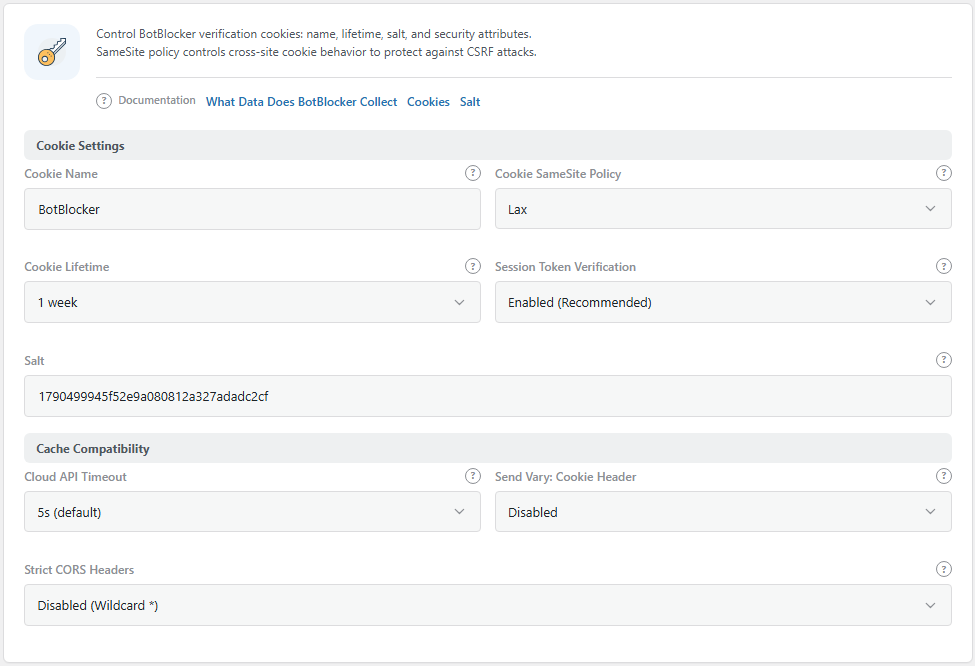
The Cookie Settings panel. Open it from BotBlocker → Settings → System → Cookie Settings.
What BotBlocker stores in the browser
BotBlocker uses three cookies for verification:
- The ID cookie. Its name is the Cookie Name (default
BotBlocker). It holds a random ID for the browser and lasts 1 year. - The pass cookie. Its name is the random ID from the ID cookie. It holds the proof that the browser passed a check. It lasts for the Cookie Lifetime (default 1 week).
- The counter cookie. Its name is the Cookie Name with
_hitsat the end, for exampleBotBlocker_hits. It counts the pages that the browser opened, for the Hits Per User limit in Where protection applies. It lasts 1 day.
When the pass expires, the visitor gets a new check. Other checks, such as network rules and Rate limiting, work separately. Some network rules apply also to visitors who hold a valid pass. Read Network connection types.
A cookie belongs to one browser, not to one person. A private window, a different browser, or a new phone starts without a pass. This is normal.
How BotBlocker knows that a pass is real
A bot could try to copy a pass cookie from a real browser. So BotBlocker does not trust the cookie alone.
With Session Token Verification (the default), the pass is a random session ID with a signature. BotBlocker keeps a matching record on your server. When the cookie comes back, BotBlocker checks four things: the signature is correct, the record exists, the pass is not older than the Cookie Lifetime, and the pass belongs to the same browser ID. A fake or copied pass fails.
The server keeps up to 50,000 records. When there are more, BotBlocker deletes the oldest 5,000. On a very busy site, some visitors can then get a new check before their pass expires.
The session token does not depend on the visitor's address. This is important for people on mobile networks, VPNs, and proxies, because their address can change between two pages. With the old method, a new address meant a new check. Many of these visitors saw checks again and again, a "verification loop". The session token stops these loops.
The Salt makes the signatures unique for your site. It is made automatically when you install BotBlocker.
Page caches need to know about the cookie
A page cache or a CDN saves a copy of a page and gives the same copy to the next visitor. This makes your site fast. But it can cause a problem with verification: the cache can save the check page and show it to a visitor who already passed, or save a normal page and show it to a bot that did not pass.
The Send Vary: Cookie Header setting tells caches to keep separate copies for different cookies. Use it only when you see this problem. Read Cache backends and Hosting and compatibility.
With Early Init, a cache plugin inside WordPress sends cached pages only to verified visitors. BotBlocker gives them a separate short-lived cookie for this: the cookie name with _cp at the end.
Settings
The defaults work for most sites. The SameSite and Session Token settings are the ones that most often explain a verification loop.
Cookie Settings
These settings control the verification cookie and how BotBlocker checks it.
Cookie Name
Default: BotBlocker
The name of the ID cookie in the visitor's browser. Change it only for a clear reason, for example when another tool on the same domain uses the same name.
When you change the name, all current passes stop working. Every visitor gets one new check. On a busy site, you see a short rise in checks after the change. The panel warns you about this when you edit the field.
Cookie Lifetime
Default: 1 week
How long a pass stays valid. You can choose from 1 day to 1 year: 1 day, 2 days, 3 days, 1 week, 2 weeks, 1 month, 3 months, 6 months, 9 months, or 1 year.
- Shorter time: returning visitors see a check more often. A bot that got a pass keeps it for less time.
- Longer time: fewer checks for your regular visitors.
A long lifetime keeps an ID in the visitor's browser for a long time. The Cookie Alert add-on can inform your visitors about cookies. Read also Privacy and data.
Cookie SameSite Policy
Default: Lax
Tells the browser when it may send the cookie with a request that starts on another site. Read more about SameSite.
- Lax: the cookie goes with normal links from other sites, but not with hidden cross-site requests. This fits almost every site.
- Strict: the cookie never goes with a request from another site. A visitor who comes back from a payment page or a login service looks new and can see a check.
- None: the cookie goes with all requests, also inside frames on other sites. This needs HTTPS. On a site without HTTPS, BotBlocker uses Lax instead.
Change this only for a clear problem, for example a payment return or an embedded page that shows a check again and again. Test the full flow after the change.
Session Token Verification
Default: Enabled (Recommended)
Chooses how BotBlocker checks a pass.
- Enabled (Recommended): a signed session token that BotBlocker checks against a record on the server. It does not depend on the visitor's address, so visitors on VPNs, proxies, and mobile networks keep their pass.
- Disabled (Legacy): the old method. The pass is a hash of the visitor's address, the host, and the browser name. When one of these changes, the pass stops working, and the visitor gets a new check.
Keep it enabled. Do not use Disabled (Legacy).
Salt
A random value that makes the pass signatures unique to your site. BotBlocker makes it automatically, and the field is read-only. Read Emergency recovery secrets.
Cache Compatibility
These settings help caches, CDNs, and browsers work correctly with verification.
Send Vary: Cookie Header
Default: Disabled
Adds the Vary: Cookie header to every page BotBlocker serves to an allowed visitor, including allowed addresses and verified search engines. A cache then keeps separate copies for visitors with different cookies.
- Enabled: fixes a cache that shows the check page to visitors who already passed.
- Disabled: the cache works as before.
The header makes caching less effective, because the cache must keep more copies. Your cache hit rate can go down. Turn it on only when you see a caching problem.
Cloud API Timeout and Strict CORS Headers
This group also has two settings that are explained on other pages:
- Cloud API Timeout (default 5 seconds): how long BotBlocker waits for the BotBlocker cloud. Read Cloud API.
- Strict CORS Headers (default off): fixes a verification check that fails to finish in some browsers. Read Responses and API access.
When something goes wrong
- Visitors see a check on every page? Open your site in a private window, pass the check, and look at the browser's cookies. If the cookies are missing, a cache or a hosting security tool can remove them. Ask your host.
- The cookies are there, but the check comes back? Make sure that Session Token Verification is enabled. Then check Cookie SameSite Policy. Use Lax unless you have a clear reason for a different value.
- Visitors see a check after a payment or a login on another site? Change Cookie SameSite Policy from Strict to Lax.
- Visitors who passed still see the check page from the cache? Turn on Send Vary: Cookie Header, or exclude the check page from your cache. Read Cache backends.
- Everyone got a new check at the same time? This happens after you change the Cookie Name. It settles after each visitor passes one check.
- Many visitors on mobile or VPN networks see checks again and again? Enable Session Token Verification. Do not block VPNs to fix this.