Payment callbacks
Make sure your payment provider can always tell your shop that an order is paid.
A customer pays on the page of your payment provider. Then the provider must tell your site that the payment worked. It does this with a separate message from its own servers to your site, a callback (also called a webhook or IPN). This message is not a person. It has no browser, no cookie, and it cannot solve a check page.
If BotBlocker treats this message like a normal visitor, it sends it to the check page or blocks it. The message never arrives. The customer has paid, but the order stays "pending". That costs you time, and it can cost you the customer. The Payment Gateways settings let these callbacks through, and they keep that door as narrow as you want.
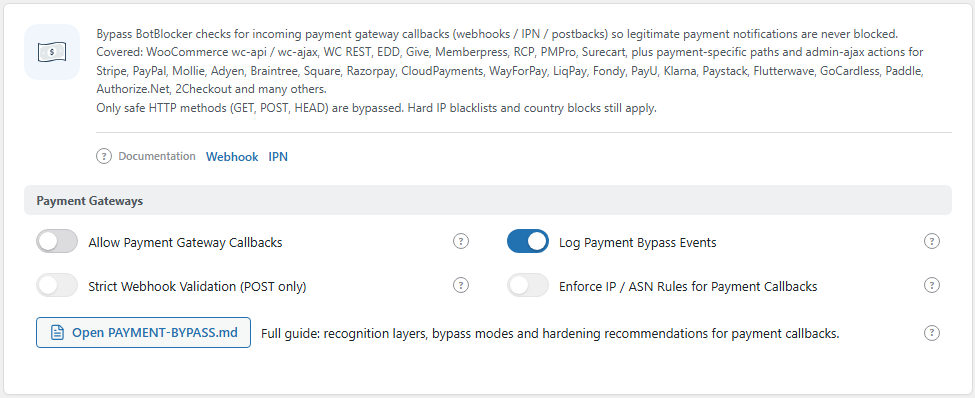
The Payment Gateways group. Open it from BotBlocker → Settings → Access Control → Payment Gateways.
How BotBlocker recognizes a callback
BotBlocker knows the callback patterns of many shop plugins and payment providers. It looks at four things, in this order:
- The path. For example
/wc-api/or/wc-ajax/of WooCommerce, and the callback paths of Easy Digital Downloads, GiveWP, MemberPress, Paid Memberships Pro, SureCart, and others. - A query key. A known key in the part of the address after
?. - An AJAX action. A known action for
admin-ajax.phporadmin-post.php, for example of Stripe, PayPal, Mollie, Adyen, Square, Razorpay, Klarna, and many more. - A signature header. Many providers sign each message with a special header, for example
Stripe-Signature. BotBlocker accepts a signature header only on aPOSTrequest.
Only GET, POST, and HEAD requests can use the bypass. The full list of patterns is in the guide that the Full guide button opens.
Two levels of trust
When a request matches, BotBlocker uses one of two levels:
- Full bypass. This is the default. BotBlocker lets the callback through at once. It skips the check page, the CAPTCHA, rate limiting, and also the IP, ASN, Rules, and Paths tabs.
- Partial bypass. BotBlocker still applies your IP, ASN, Rules, and Paths rules and rate limiting. Only the check page and the CAPTCHA are skipped. BotBlocker uses this level when Enforce IP / ASN Rules for Payment Callbacks is on. It also always uses it for callbacks that match only a generic name, such as
webhook,postback, orcallback_handler. Such names are easy to fake.
The early layers run before BotBlocker checks for a callback. So if you use Early Init or the MU layer, their IP and country blocks apply to callbacks at both levels. See Early phase and MU mode.
Test with a real order
Opening the checkout page proves nothing. The callback comes later, from the provider's servers. To test:
- Turn on Allow Payment Gateway Callbacks and keep Log Payment Bypass Events on.
- Put your payment provider in test mode (sandbox).
- Place a test order and pay it.
- Check that the order status changes to paid.
- Open the visitor log and look for an entry that starts with "Payment bypass". It shows the path, key, action, or header that matched. See Traffic and audit logs.
Settings
Payment Gateways
Allow Payment Gateway Callbacks
Default: Off
The main switch. When it is on, requests that match a known callback pattern skip the check page, the CAPTCHA, and rate limiting.
- On: recommended for every site that takes payments, for example with WooCommerce, a membership plugin, a donation form, or a booking plugin.
- Off: callbacks go through the normal checks. On a shop, this can leave paid orders as "pending".
If your site takes no payments, keep it off. An unused door is only a risk.
Log Payment Bypass Events
Default: On
Writes an entry to the visitor log each time a callback uses the bypass. The entry shows which pattern matched. This is the fastest way to prove that a callback arrived. The log grows with each order, but the entries are small. Keep it on.
Strict Webhook Validation (POST only)
Default: Off
Without this switch, a normal GET link with a payment key or action in its address also gets the bypass. With this switch, only POST requests get it. Real callbacks from almost all providers use POST. So this switch closes a door for fake requests and usually keeps payments working.
Turn it on after your first successful test order. Then place one more test order. Some older providers send their confirmation as a GET redirect. If the order stays "pending" after you turn this on, turn it off again.
Enforce IP / ASN Rules for Payment Callbacks
Default: Off
Switches to the partial bypass. Callbacks still skip the check page and the CAPTCHA, but your IP, ASN, Rules, and Paths rules and rate limiting still apply. So an address that you blocked cannot use a callback path to get in.
Before you turn it on, make sure that no rule blocks your provider. Some providers send callbacks from cloud networks, and a broad ASN block can catch them. Place a test order afterwards.
When something goes wrong
- Orders stay "pending" after payment? Check that Allow Payment Gateway Callbacks is on. Place a test order and look for a "Payment bypass" entry in the visitor log.
- The log shows the callback, but the order is still "pending"? BotBlocker let it through. The problem is in the shop plugin or the provider settings. Check the provider's webhook log.
- No "Payment bypass" entry, and the visitor log shows a block or a check page for the callback? The provider uses a pattern that BotBlocker does not know. Add an Allow rule for its callback path on the Paths tab. See Rules and IP lists.
- Callbacks stopped after you changed a switch? Turn off Strict Webhook Validation (POST only) and Enforce IP / ASN Rules for Payment Callbacks one at a time, and test after each change.
- No trace of the callback in the visitor log at all? Something before WordPress may refuse it, for example your host's firewall or a CDN rule. Or the provider never sent it. Check the provider's delivery log first.