Speed Up
Make your pages lighter by turning off the WordPress extras that you never use.
WordPress is built to fit every site. So it loads many small extras on every page: an emoji script, embed tools, feed links, comment tools, and old hints in the page code. Your site may use none of them. But your visitors still download them, and each one adds a little wait.
This add-on gives you one switch for each extra. You turn off what your site does not need, and you keep the rest. Some switches also hide details that attackers look for, such as your WordPress version. So you get a faster site and a smaller target at the same time.
Nothing changes until you decide. All switches are off when you activate the add-on.
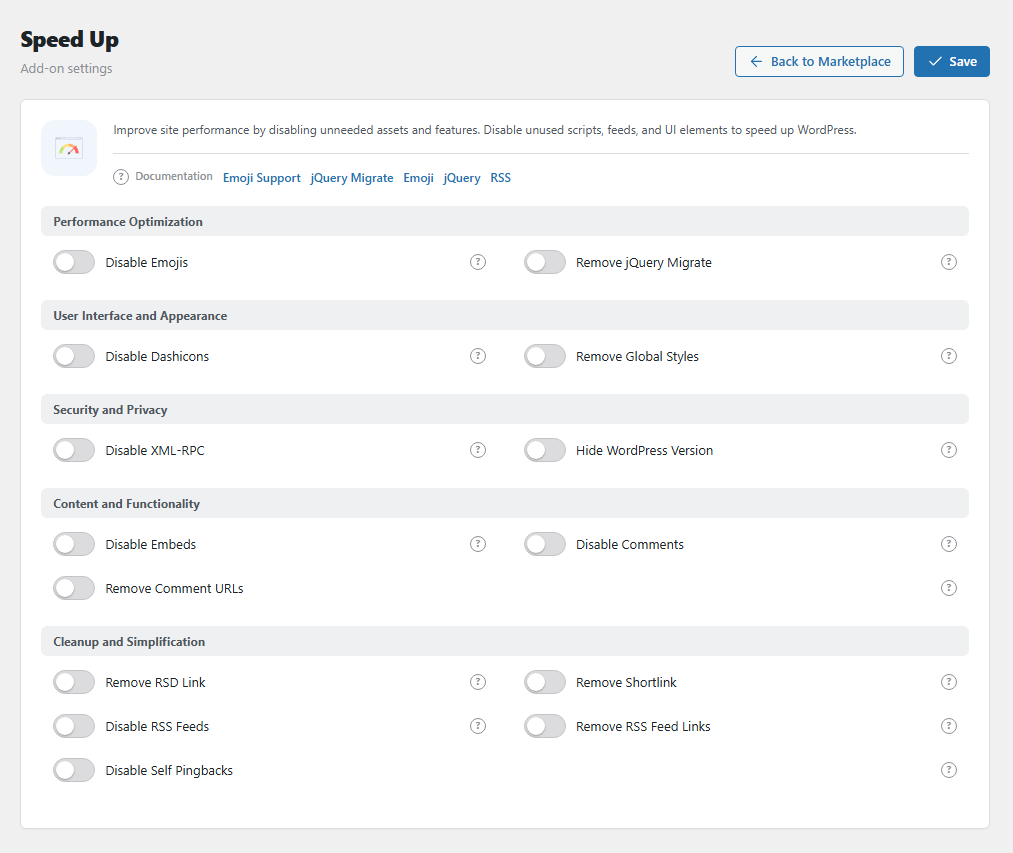
The Speed Up settings panel. Open it from BotBlocker → Add-ons.
Each switch removes a feature, not only its output
When you turn off an extra here, WordPress no longer loads that feature. It does not only hide it on the page. This is what makes your pages lighter.
If your site uses one of these features, it stops working when you turn it off. To find this quickly, change one switch at a time and check your site after each change. To undo a change, turn the switch back on.
Start with the safe switches
Some switches almost never break anything. Others change what your visitors and editors can do.
| Almost no risk | Test after you turn it on | Changes features |
|---|---|---|
| Disable Emojis | Remove jQuery Migrate | Disable Embeds |
| Remove RSD Link | Disable Dashicons | Disable Comments |
| Remove Shortlink | Remove Global Styles | Disable RSS Feeds |
| Remove RSS Feed Links | ||
| Hide WordPress Version | ||
| Disable Self Pingbacks | ||
| Remove Comment URLs |
A good plan: turn on the first column today. Turn on the second column one by one, and check your home page and your forms after each one. Use the third column only when you are sure that nobody uses the feature.
Settings
All switches are off by default. When a switch is off, WordPress works as usual for that feature. You can turn on any switch without the others. The settings below are in the same 5 groups as in the panel.
Performance Optimization
Disable Emojis
Default: Off
Stops WordPress from loading its emoji script and emoji styles, on public pages and in the admin area. Modern browsers and phones show emojis without help, so most visitors see no change. Your pages only get smaller.
For example, a smiley in a post still shows. The only difference: on a very old browser, it can show as a plain symbol, not a colored picture.
Remove jQuery Migrate
Default: Off
jQuery is a common script library that many themes and plugins use. jQuery Migrate is a helper that lets old plugins use old jQuery commands. This switch removes the helper from your public pages. The admin area keeps it.
Risk: an old slider, menu, or form plugin can stop working. After you turn this on, test your home page, your menus, and your forms. If something breaks, turn it off again.
User Interface and Appearance
Disable Dashicons
Default: Off
Dashicons is the icon font of the WordPress admin area. WordPress sometimes loads it on public pages too. This switch removes it for visitors who are not logged in. Logged-in users still get it, so the toolbar at the top of the page looks the same for you.
Risk: a few themes use Dashicons for their own icons, for example a search or menu icon. If an icon turns into an empty box for visitors, turn this off.
Remove Global Styles
Default: Off
Removes a style block that WordPress adds to your public pages. This block holds the colors, fonts, and spacing from the site editor.
Risk: block themes (modern themes that you edit in Appearance → Editor) need this block. With a block theme, colors and spacing can change or disappear. With a classic theme, it is usually safe. Look at a few pages after you turn it on.
Security and Privacy
Disable XML-RPC
Default: Off
Closes /xmlrpc.php, the second entry point of WordPress. A request to it gets a 403 answer. Your site also stops sending and taking pingbacks, and removes the pingback line from your pages.
An address with an Allow rule in your IP lists still gets through. To keep XML-RPC open only for some services, use XML-RPC Tunnel instead.
Risk: some plugins (for example Jetpack) and the WordPress mobile app need XML-RPC. They stop working while this switch is on.
Hide WordPress Version
Default: Off
Removes your WordPress version number from your page code and from your feeds.
This does not make your site stronger. An old version is still old. But simple scanners often read this number to find sites with a known weak version. Without it, your site is a less easy target. Keep WordPress up to date too.
Content and Functionality
Disable Embeds
Default: Off
An embed is a small preview box of other content. For example, you paste a link to a post on another blog, and WordPress shows a card with its title and picture. This switch turns off the WordPress part of that system:
- Other sites cannot show your posts as embed boxes. The embed address of your posts stops working, and its script and hints go away from your page code.
- Your site stops looking for embed boxes on unknown sites. For example, a link to a post on another WordPress blog stays a plain link.
Big known services that WordPress has on its own list, such as YouTube, can still show a player.
Before you turn it on: links to sites that are not on the WordPress list show as plain links in your posts, not as preview cards. If your editors use these cards, keep this switch off.
Disable Comments
Default: Off
Closes comments on the whole site. This is a big switch. It does all of this at once:
- Comments and pingbacks are closed on all public post types (posts, pages, and others).
- The comment form and the list of old comments are gone from your public pages.
- Comment feeds give an error page, and their links go away from your page code.
- The Recent Comments widget is removed.
- In the admin area, the Comments menu and Settings → Discussion are removed. If you open them, you see "Comments are disabled."
- The comment count goes away from the dashboard and the toolbar.
Your old comments are not deleted. They stay in the database. But nobody can see them while this switch is on. When you turn it off again, they come back.
Use this only if your site really does not use comments.
Remove Comment URLs
Default: Off
Removes the Website field from the comment form. Also, the names of old commenters are no longer links to their websites.
Spammers often write comments only to get a link to their site. Without the link, spam is not worth their time. Comments still work normally. This is a good choice if you want to keep comments but get less spam.
Cleanup and Simplification
Remove RSD Link
Default: Off
Removes the "Really Simple Discovery" line from your page code. Very old publishing tools used this line to find XML-RPC. Modern tools do not need it. Safe to turn on.
Remove Shortlink
Default: Off
WordPress adds a short address for each post, like example.com/?p=123, to your page code. This switch removes that hint. The short address itself still opens the post. Safe to turn on.
Disable RSS Feeds
Default: Off
A feed is a list of your newest posts in a format that other tools can read. This switch turns off all feeds. A person or tool that opens a feed address gets an error page with a link to your home page.
Risk: feed readers, podcast apps, newsletter tools, and some news services read your feed. If you use any of them, keep this off.
Remove RSS Feed Links
Default: Off
Removes the feed links from your page code. The feeds still work if somebody knows their address. This is only a cleanup, not a block. Safe to turn on.
Disable Self Pingbacks
Default: Off
When one of your posts links to another of your posts, WordPress sends a pingback to itself. Then a useless note appears in your comment list. This switch stops these notes to yourself. Pingbacks to other sites still work. Safe to turn on.
When something stops working
- A page looks wrong after a change? Turn off the last switch that you turned on. Clear your page cache and reload.
- A slider, menu, or form stopped working? Turn off Remove jQuery Migrate first, and test again.
- Icons show as empty boxes for visitors? Turn off Disable Dashicons.
- Colors or spacing changed on a block theme? Turn off Remove Global Styles.
- Old comments are gone? They are not deleted. Turn off Disable Comments and they come back.
- A feed reader or newsletter tool stopped updating? Turn off Disable RSS Feeds.