Reverse-DNS cache
Check a search bot's name once, then let it through quickly for weeks.
Many bots claim to be Googlebot or Bingbot, because sites let search engines in. BotBlocker does not trust that claim. It asks DNS for the name behind the visitor's address, a reverse DNS (PTR) lookup. A real Googlebot comes from an address whose name ends in googlebot.com or google.com. A fake one does not. The check itself is described in Bot detection signals and Trusted bots.
The lookup has a cost. BotBlocker must ask a DNS server on the internet and wait for the reply, and that can take a moment. Search bots visit often, so asking again on every visit would slow down your site for no reason. The settings on this page make BotBlocker remember two things: the name of each address it looked up, and an allow rule for the whole network of a bot it already verified.
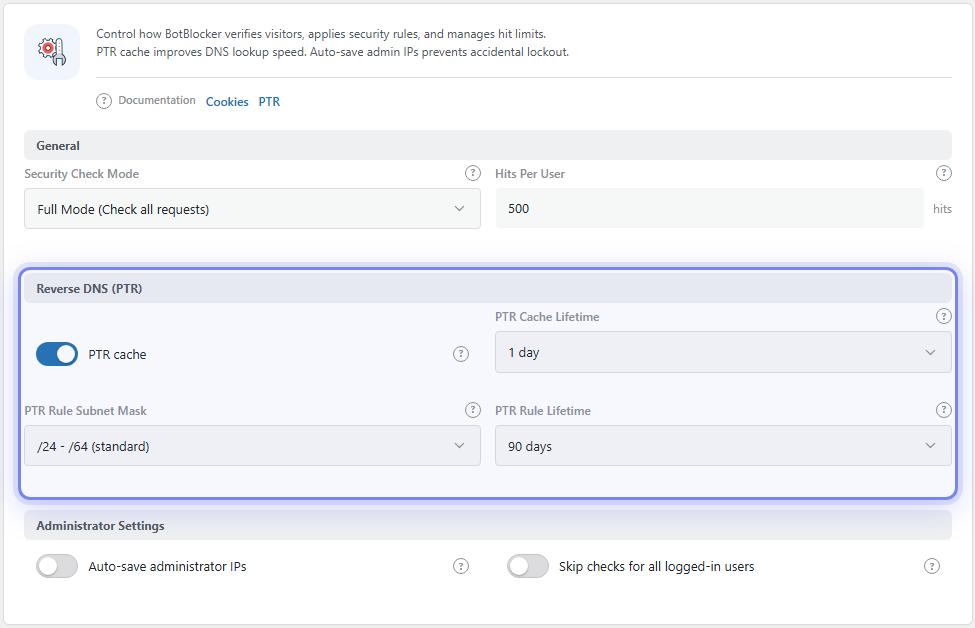
The Reverse DNS (PTR) group. Open it from BotBlocker → Settings → System → General.
Two kinds of memory
It helps to keep these two apart, because they have their own lifetimes.
The name cache remembers the answer to "what name belongs to this address?". BotBlocker stores it in its database, and also in Redis or Memcached if you use one (see Cache backends). The next visit from the same address reuses the stored name and does not wait for DNS. The PTR Cache Lifetime decides how long a name stays.
The allow rule is a step further. When a bot passes the check, BotBlocker adds an allow rule for its network to your IP rules. The next visit from that network matches the rule at once, and BotBlocker does not need a lookup at all. The PTR Rule Subnet Mask decides how large that network is, and the PTR Rule Lifetime decides when the rule expires.
An example
Googlebot visits from 66.249.66.1, with the default settings:
- BotBlocker looks up the name:
crawl-66-249-66-1.googlebot.com. The name matches Google, so the visit is allowed. - The name is stored for 1 day. Another visit from the same address today skips the DNS lookup.
- BotBlocker also adds an allow rule for
66.249.66.1/32, the exact address that was checked. The rule note shows the bot's user agent and the address it came from. - For the next 90 days, Googlebot visits from that exact address match the rule and pass at once. Other addresses in the same network are checked again.
- After 90 days the rule expires. The next visit is checked by DNS again, and a new rule is made if it still passes.
BotBlocker makes this rule only for bots it verified by their name. A bot that is trusted by its address or network owner does not get one, because it is already fast to check.
Settings
All four settings are in BotBlocker → Settings → System → General, in the Reverse DNS (PTR) group. The Health Status page and the sidebar also show a switch for the PTR cache and its lifetime.
Reverse DNS (PTR)
PTR cache
Default: On
BotBlocker stores every reverse DNS answer, so a repeat visit from the same address does not wait for DNS again.
- On: each address is looked up once per PTR Cache Lifetime. This is the right choice for almost every site.
- Off: every visit that needs a name waits for a fresh DNS lookup. The check is the same, only slower. Turn it off only for a short time, to test a DNS problem.
The allow rules below are made even when this switch is off.
PTR Cache Lifetime
Default: 1 day
How long one stored name stays in use. You can pick 1 day, 2 days, 3 days, 1 week, 2 weeks or 1 month. Old entries are removed by a background task.
- Shorter time: a name change is seen sooner, but BotBlocker asks DNS more often.
- Longer time: fewer lookups, but an old name stays in use longer.
Search engines rarely change their names, so the default is a good balance.
PTR Rule Subnet Mask
Default: /32 - /128 (single IP)
How large a network the allow rule covers. The first number is for IPv4 and the second for IPv6. You can pick:
- /32 - /128 (single IP): the rule covers only the exact address that passed. This is the strictest choice and the default. Bots that move between addresses need a new lookup for each one.
- /28 - /64 (small subnet): 16 IPv4 addresses, or one IPv6 /64 network.
- /24 - /64 (standard): 256 IPv4 addresses, or one IPv6 /64 network. Wider than the default; enable only if you accept that unchecked neighbours are trusted too.
A larger range means fewer lookups, because one check covers the bot's neighbours too. A smaller range is safer, because the rule trusts fewer addresses that were never checked. Search engines keep their crawlers in their own ranges, so the standard size is safe for them.
PTR Rule Lifetime
Default: 90 days
How long an allow rule stays before it expires. You can pick 10, 30, 60, 90 or 120 days.
- Shorter time: BotBlocker checks the network again sooner. If a provider hands a range to someone else, the old trust ends sooner.
- Longer time: fewer lookups over time, and fewer rules to rebuild.
When something goes wrong
- Many allow rules appear in your IP rules? That is normal. Each one is a verified bot network, and each one expires by itself after the PTR Rule Lifetime.
- You want to check a bot again now? Delete its allow rule in IP rules. The next visit is checked by DNS again.
- A real search bot is blocked as fake? The name did not match. This is a detection question, not a cache question. See Trusted bots and Bot detection signals.
- Checks feel slow for bots? Make sure PTR cache is on. If lookups themselves fail, your host's DNS resolver may be slow or blocked, which BotBlocker cannot fix.
- The site moved behind a proxy or CDN, and names look wrong? BotBlocker may see the proxy's address, not the visitor's. Fix the real-address setup first (see Hosting and compatibility), then delete the wrong allow rules.