Cache backends
Give BotBlocker a fast place to remember answers, so it does not ask the same slow question twice.
BotBlocker checks every visit while WordPress loads. Most checks are fast, because they only compare the request with your rules. But some answers come from outside your site: a reverse DNS lookup, the visitor's country, or a reply from BotBlocker Cloud. Asking again on every visit wastes time, because these answers rarely change.
So BotBlocker keeps the answers in a cache for a short time. By default, it keeps them in small files in its own data folder, and this works on almost every host. If your host gives you Redis, Memcached or APCu, you can tell BotBlocker to use that memory store instead. Memory is faster than files, and Redis and Memcached can share the same answers between several web servers.
A cache is temporary. If you clear it, BotBlocker simply asks the questions again. You never lose settings, rules or block lists.
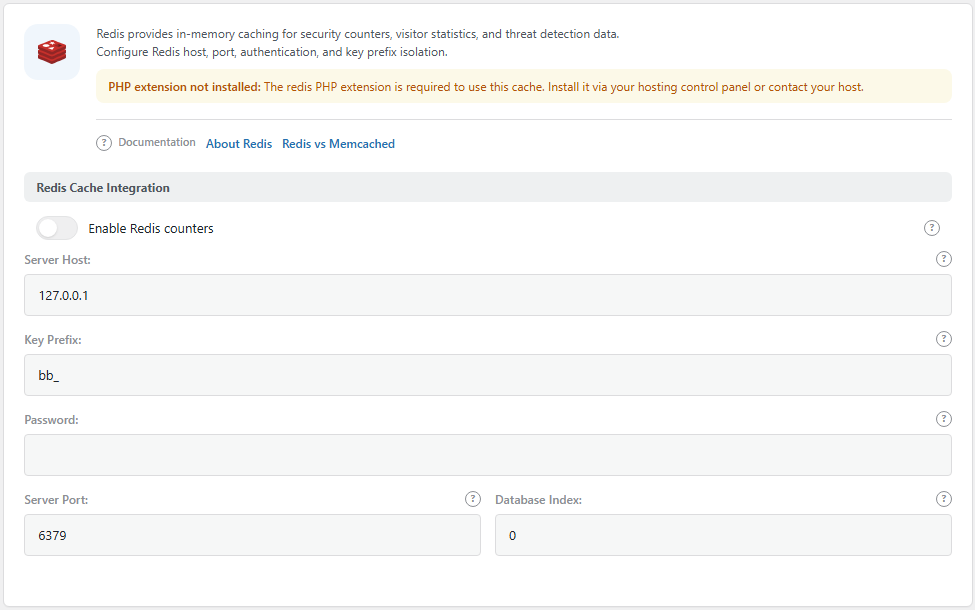
The Redis panel. Open it from BotBlocker → Integrations → Redis. The Memcached, APCu and Transients panels are in the same list.
What BotBlocker keeps in the cache
The cache holds short-lived answers that BotBlocker needs again soon:
- replies from BotBlocker Cloud, so a returning visitor is not checked by the Cloud again;
- the country of an address, kept for up to a week;
- reverse DNS names, when the PTR cache is on;
- counters for login attempts, so brute-force protection can count fast.
Each entry has its own expiry time. After it expires, the next visit builds it again. Expired disk files remain until a write needs space or the cache is cleared.
BotBlocker picks one store, in a fixed order
You can switch on more than one backend, but BotBlocker uses only one at a time. It tries them in this order:
- Redis, if it is on and it answers.
- Memcached, if it is on and it answers.
- APCu, if it is on and it answers.
- The file cache in BotBlocker's data folder. This always exists and needs no setup.
- WordPress transients, only when BotBlocker cannot write to its data folder, and only if the Transients switch is on.
So for most sites, the file cache does the work, and you do not need to change anything. Turn on Redis, Memcached or APCu only when your host already runs that service for you.
When a memory store stops answering
Memory stores can fail: the service restarts, the server is full, or the password changes. BotBlocker does not let this break your site. When Redis, Memcached or APCu does not answer, BotBlocker falls back to the next store in the list. It then waits 60 seconds before it tries the failed store again. So a short outage costs one failed connection per minute, not one per visit. Your setting stays on, and BotBlocker goes back to the memory store as soon as it answers again.
Still, a store that never works is a waste. If the panel shows PHP extension not installed, the switch is locked, because PHP cannot talk to that service at all. Ask your host to add the extension, or leave the switch off.
Pick the right store for your hosting
- One server, normal traffic: keep the defaults. The file cache is enough.
- One server, a lot of traffic, APCu available: APCu is the easiest upgrade. It needs no host name, port or password.
- Several web servers or several PHP pools: use Redis or Memcached. APCu memory belongs to one PHP pool on one server, so each server would keep its own counters. A bot could then get a fresh login-attempt count on each server.
- Your site already uses Redis or Memcached (for example through an object-cache plugin): use the same service. Give BotBlocker its own key prefix, so its entries stay apart.
It works together with other caches
BotBlocker's own short-term memory is easy to confuse with two other caches:
- Page caches and CDNs keep whole pages. They can serve a stored page and skip BotBlocker's check. That is a protection problem, not a speed problem. See Cookies and sessions and the Cache tab in BotBlocker → Integrations. The Cache tab also detects known CDN and edge-cache providers from request and response headers, so you can see when a cache sits in front of the site.
- The interface cache keeps the numbers for BotBlocker's own admin pages. It only changes how fast those pages open. See Interface Caching.
Settings
The interface cache is in BotBlocker → Settings → System → UI Settings. The stores are in BotBlocker → Integrations, one tab each.
Interface Caching
These settings control how often BotBlocker rebuilds the statistics on its admin pages. They do not change how visitors are checked.
Cache Plugin Interface
Default: On
BotBlocker keeps a ready copy of the numbers on the Dashboard and Reports pages, so they open fast. It does not count the traffic again each time you open a page. The copy is stored in WordPress transients.
- On: admin pages open faster. The Dashboard shows "(Updated every 30 minutes)" next to the numbers, so you know they can be a little old.
- Off: every page view recounts the data. The Dashboard shows "(Real-time)". On a busy site with a large log, pages can open slowly.
Turn it off for a short time when you watch a change live, for example during an attack. Turn it on again after.
Cache Duration
Default: 30 minutes
How long the ready copy stays in use before BotBlocker counts again. You can pick 5 minutes, 15 minutes, 30 minutes, 1 hour, 2 hours, 6 hours or 12 hours.
- Shorter time: the numbers are fresher, but pages rebuild more often.
- Longer time: less work for the server, but the numbers can be up to that old.
Redis Cache Integration
Redis is a separate memory service. BotBlocker connects to it with the details your host gives you. The PHP redis extension must be installed, or the switch is locked.
Enable Redis counters
Default: Off
BotBlocker keeps its short-term answers and counters in Redis instead of in files. Redis is first in the order, so when it is on and it answers, BotBlocker uses it.
Turn it on only when your host runs Redis and you have the connection details. If Redis stops answering, BotBlocker uses the next store and tries Redis again after 60 seconds.
Server Host:
Default: 127.0.0.1
The address of the Redis server. 127.0.0.1 means "this same server". Change it only if your host tells you that Redis runs somewhere else.
Server Port:
Default: 6379
The port where Redis listens. 6379 is the standard Redis port. Use the port from your host if it is different.
Password:
Default: empty
The Redis password, if your Redis needs one. Leave it empty if it does not. Treat this like any other password: do not show it in screenshots or support messages.
Key Prefix:
Default: bb_
A short text that BotBlocker puts in front of each key it stores. It keeps BotBlocker's data apart from other programs that use the same Redis. If several sites share one Redis, give each site its own prefix, for example bb_shop_ and bb_blog_.
Database Index:
Default: 0
Redis has numbered databases inside one service. Use the number your host gave you. If you do not know it, keep 0.
Memcached Cache Integration
Memcached is another memory service, often found on managed hosting. The PHP memcached extension must be installed, or the switch is locked. Memcached has no password or database number in BotBlocker, only host, port and prefix.
Enable Memcached counters
Default: Off
BotBlocker keeps its short-term answers and counters in Memcached. It is second in the order, so it is used only when Redis is off or does not answer.
Turn it on only when your host runs Memcached. If it stops answering, BotBlocker uses the next store and tries again after 60 seconds.
Server Host:
Default: 127.0.0.1
The address of the Memcached server. Keep 127.0.0.1 if Memcached runs on the same server as your site.
Server Port:
Default: 11211
The port where Memcached listens. 11211 is the standard port.
Key Prefix:
Default: bb_
The text in front of each BotBlocker key in Memcached. Give each site its own prefix when several sites share one Memcached.
APCu Cache Integration
APCu is memory inside PHP itself. It needs no separate service and no connection details, so it is the simplest memory store. The PHP apcu extension must be installed, or the switch is locked.
Enable APCu counters
Default: Off
BotBlocker keeps its short-term answers and counters in APCu memory. It is third in the order, after Redis and Memcached.
APCu memory belongs to one PHP pool on one server. On hosting with several servers or pools, each one has its own copy, so counters are split between them. On that kind of hosting, use Redis or Memcached instead.
Key Prefix:
Default: bb_
The text in front of each BotBlocker key in APCu. It keeps BotBlocker apart from other programs in the same PHP memory.
Transients
Transients are WordPress's own temporary storage in the database. BotBlocker uses them only as a backup store.
Store Cloud API responses in transients
Default: On
When BotBlocker cannot write its cache files (for example, the data folder is read-only), it stores the answers in WordPress transients instead. This covers Cloud replies and the other short-term answers above.
- On: BotBlocker still has a cache when its folder cannot be written.
- Off: if the folder cannot be written, BotBlocker keeps no cache at all and asks every question again on each visit.
Keep it on. It costs nothing when the file cache works.
File cache limit
Maximum cache files
In Integrations > Cache, move the Maximum cache files slider, then save. Default: 2,000. Range: 500–50,000. The limit applies separately to each site's disk cache, including rate-limit buckets even when an external cache backend is enabled.
When a new entry reaches a full cache folder, BotBlocker removes the least recently written entries until the folder is down to 90% of its quota. Overwriting a key refreshes its write time. Expiry comes from the stored payload; reads do not delete files, and trimming does not inspect payloads or give expired entries priority. Space stays reserved for an atomic write. Lower limits protect your hosting account's file allowance but may evict active rate buckets during an attack. A lower limit takes effect as new entries arrive; overwriting an existing entry does not trigger trimming. Locks and directory metadata sit outside the cache-entry allowance. There is no scheduled file cleanup.
Common problems
- The switch for Redis, Memcached or APCu is grey and locked? PHP does not have that extension. Ask your host to install it, or keep using the file cache.
- The site got slower after you turned on a memory store? The service may not answer. Check host, port, password and database with your host. Turn the switch off to confirm: if the site is fast again, the connection was the problem.
- Login-attempt counts look too low on a multi-server site? You may use APCu, which counts per server. Switch to Redis or Memcached.
- Two sites on one Redis see each other's data? They share a key prefix. Give each site its own prefix.
- Admin numbers look old? The interface cache is on. Wait for the Cache Duration to pass, or turn Cache Plugin Interface off for a moment.
- You want an empty cache now? Use Clear Object Cache in BotBlocker → Tools → Maintenance. See Tools and maintenance.
- Visitors see the check page again and again? That is usually a page cache or CDN in front of the site. Read Cookies and sessions.